An OTP sharing scam begins long before the six digits arrive — it begins with a story built to sound ordinary. Someone claims to be support. Someone claims a code reached you by mistake. Someone sends a login page that looks exactly like the one you used yesterday. The code itself is only the final step, and by the time you read it aloud or paste it into a chat window, the decision has already been made for you.
This breakdown covers the six signals that show up before that moment, the three specific approaches aimed at people holding cricket IDs, casino IDs and colour-prediction accounts, and what can and cannot be undone afterwards. Players must be 18+; real-money play carries risk and losses are the expected outcome.
What Most Warnings About The OTP Sharing Scam Get Wrong
Almost every article on this subject treats it as a problem of intelligence. Never share your OTP with anyone, they say, as though the people who do share it simply failed to read the warning printed in the message. That framing is comfortable and almost entirely useless, because nobody hands over a code believing they are being robbed. They hand it over believing they are solving a problem — a stuck withdrawal, a locked account, a friend in trouble, a verification step that appeared one screen earlier than expected.
The second mistake is scope. Most coverage of the OTP sharing scam is written around bank and messaging-app takeovers, then stretched thin to cover gaming accounts with a sentence or two. The mechanics are genuinely different. A person holding a cricket ID or a casino ID usually got that account through an intermediary rather than a self-service signup. Their support contact is a chat handle, not a verified channel. Their balance moves through wallets and UPI handles rather than a single bank relationship. Every one of those conditions makes a convincing impersonation easier, because there is no official baseline to compare the approach against.
The third mistake is timing. Warnings are written as if the dangerous moment is the request. It is not. The dangerous moment is the twenty seconds before the request, when a plausible reason is installed in your head. Once that reason is accepted, the code feels like paperwork. Everything useful in this breakdown is about recognising the setup, not the ask.
So the rule worth internalising is narrower and more honest than the usual slogan: a code is not proof of who you are. It is permission for something to happen right now. If you did not start the thing that is about to happen, the code does not belong in the conversation at all.
What An OTP Actually Authorises
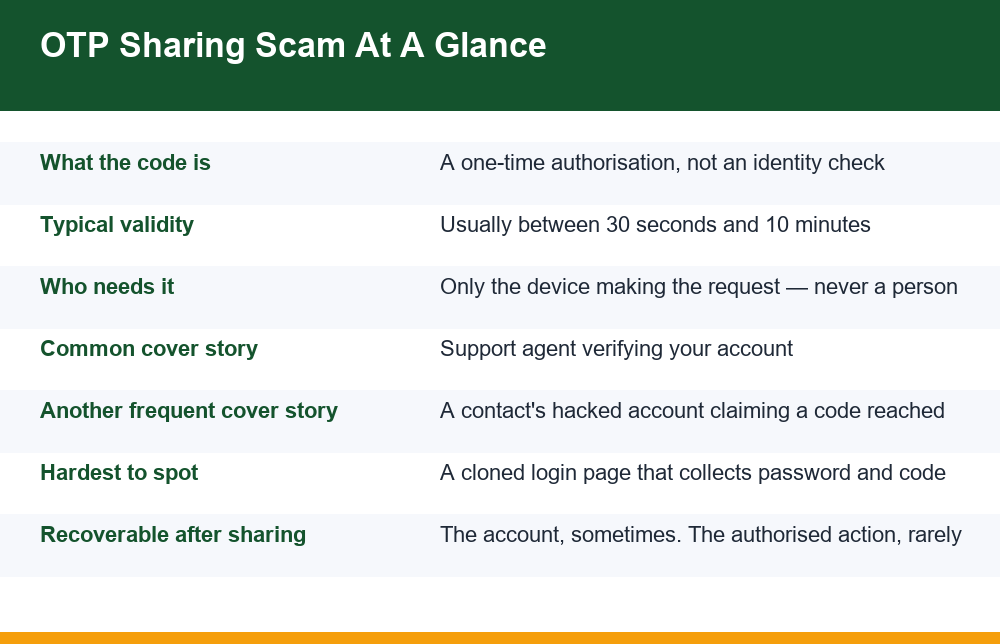
A one-time password is not a second password. A password answers the question “who are you?” A one-time code answers a completely different question: “do you approve this specific action, from this specific device, in the next few minutes?” That difference is the whole reason an OTP sharing scam works. People treat the code as an identity document, so passing it along feels like showing ID. It is closer to signing a blank authorisation and handing it to a stranger.
Depending on where it was triggered, a single code can authorise any of the following:
- A login from an unknown device — the most common outcome, and the one that quietly leads to all the others
- A password change, which locks you out of your own account within seconds
- A change of registered mobile number or email, which removes your route back in
- A withdrawal or transfer to a wallet, UPI handle or bank account you have never seen
- A new device binding on a payment app, so future requests no longer need you at all
- Linking your number to a messaging account on someone else’s handset, which then gets used on your contacts
Notice that none of those require your password once the code is in play, and several of them are designed specifically to make recovery harder. That is why the aftermath is so uneven: sometimes the account comes back, and the money does not. Our walkthrough on getting back into a cricket ID after losing your credentials sets out the same point from the other direction — the one element nobody can retrieve for you later is a code that has already been used.
There is a detail in the message itself that almost nobody uses. Most services print the action beside the code: logging in, changing a password, confirming a payout, adding a new payment destination. That one line is the most reliable information you will get in the whole exchange, because it comes from the service rather than from the person talking to you. If the message describes a withdrawal and the conversation is about a bonus, the message is right and the conversation is not. Reading past the digits to the sentence around them takes two seconds and settles the question without any judgement about who is on the other end.
Codes also expire fast, usually between thirty seconds and ten minutes. That short window is not a safety feature from the attacker’s point of view; it is a pressure tool. It gives them a legitimate-sounding reason to rush you, and rushing is the point. Nothing genuine about your account breaks because you spent five minutes checking — at worst a code lapses and the service sends another one, which costs you nothing.
6 Proven Signs Someone Is Working An OTP Sharing Scam
These are not guesses about tone or grammar. Each one is a structural tell — something the approach has to do in order to function, which means it shows up whether the person contacting you writes well or badly, in English or in Hindi, by call or by chat.
| Sign | What it looks like | Why it is a tell |
|---|---|---|
| You did not start it | A code arrives with no action from you, then a message or call follows | A legitimate code is always a response to something you just did. An unrequested code means someone else already has your number and is pushing a request |
| A clock is introduced | “The code expires in two minutes”, “the server will lock”, “your withdrawal will be cancelled” | Urgency exists to stop you checking. Real processes survive you taking ten minutes to think |
| The contact arrived, not you | They messaged you, or called you, rather than you opening a support channel yourself | Inbound contact is the cheapest thing in the world to fake. Outbound contact you initiate cannot be faked |
| The code is framed as identity | “Just confirm the code so I can verify it’s really you” | Verification never requires the code itself. This phrasing is the single most reliable marker |
| Reading it aloud is encouraged | They ask you to say the digits on a call, or to screenshot the message | Shifting from typing to speaking removes the on-screen warning text from your attention |
| There is a reward or a rescue | A bonus to unlock, a stuck payout to release, a friend locked out and desperate | Emotion — greed, relief, loyalty — is the delivery mechanism. The code is just the payload |
One sign on its own can occasionally be innocent. Two together is effectively conclusive. The three that tend to arrive as a set are an unrequested code, inbound contact and a clock, and they travel together for a structural reason: the code has to be triggered remotely, the victim has to be reached, and the checking has to be cut short. Remove any one of the three and the approach stops working, which is why all three are nearly always present.
There is also a useful inversion. Instead of asking “is this person genuine?”, ask “what action is this code about to approve?” If you cannot name the action, there is no safe answer to give. This flips the problem from one you cannot solve — assessing a stranger’s honesty over a chat window — to one you can, because you either started an action a moment ago or you did not.
Three Patterns Aimed Specifically At ID Holders
Generic advice misses these because they depend on how cricket-ID, casino-ID and colour-prediction accounts are actually distributed and supported. In each case the OTP sharing scam is fitted around an existing, ordinary-looking relationship rather than imposed on a stranger.
1. The "support agent" who needs to verify you
Someone reaches you on a messaging app using a display name and photo built to match the service — a logo, a job title, sometimes a convincing-looking employee code. The opening line is almost always about a problem you half recognise: a pending withdrawal, a deposit that did not reflect, a routine KYC re-check. They then ask you to confirm the code that has just arrived, or that is about to arrive, “to verify the account is yours before I release it”.
The structural flaw is simple. An agent who can genuinely see your account does not need a code to know it is yours; they can already see it. An agent who cannot see your account has no standing to ask for anything. Either way the request makes no sense — which is exactly why it is dressed up in process language.
2. A contact’s compromised account asking for a code "sent by mistake"
This one is effective because it is not impersonation at all. The message really does come from your friend’s account; the account has just stopped being under your friend’s control. The script is short and almost always identical in shape: they are locked out, the verification code went to your number instead of theirs by mistake, please send it across, they will explain later.
No system sends a verification code for one person’s account to a different person’s number. The premise is impossible. But it arrives wrapped in a real name, real chat history and real urgency, and that combination defeats scepticism far more reliably than any amount of polished fakery. The only safe response is to move the conversation off that channel entirely — call the person on the number you already have, and wait.
3. The cloned login page that collects both halves at once
A link circulates through a group, a short-link redirect or a promoted post. The page that opens is a close copy of a familiar login screen. You enter your number and password; the page says a code has been sent and shows a code box. Meanwhile the real site has genuinely sent you a code, because the clone used your details to trigger a real login attempt. You type the code into the fake box, it is relayed within seconds, and the session on the other side is now live.
Two things make this version harder to catch than the other two. The code you receive is real, so the message looks exactly as it should. And the page you are looking at may be pixel-accurate, because copying a public login screen requires no skill at all. What cannot be copied is the address in the bar at the top of the browser, which is why that is the only thing worth checking.
This is why no amount of care about who you talk to protects you here — you never spoke to anyone. Confirming the address bar yourself, rather than trusting any link, is the only defence that holds. Our breakdown of how to tell a genuine login page from a lookalike copy walks through the specific checks, and the habit it teaches — typing the address yourself, every time — is worth more than any single warning sign in the table above.
Can Customer Support Legitimately Ask For Your OTP?
No. Not as a matter of stated policy, and not as a matter of technical capability. There is no genuine support workflow anywhere in banking, payments, messaging or gaming accounts in which an agent needs to hear or read a one-time code in order to help you. The code’s only function is to authorise an action from the device requesting it. An agent typing it in would be authorising their own device, not yours.
This is also the plainest possible test, and it is worth memorising precisely because it needs no judgement. You do not have to assess whether the accent is right, whether the logo is accurate, whether the employee ID looks real, or whether the chat is polite. The moment a code is requested by a human being, for any stated reason, the conversation is over. Banks, payment networks and public safety material all repeat the same line: no institution, and no employee of one, will ask for your OTP, PIN, CVV or password.
Three related requests deserve the same treatment, because they achieve the same result by a different route:
- Screen-sharing or remote-access apps. If someone can see your screen, they can read every code as it arrives without ever asking for one. A support process that needs remote control of your phone is not a support process
- "Forward the message to this number." Forwarding the SMS is sharing the code. So is a screenshot, a photo of the screen, or reading it out on a call
- "Approve the prompt on your phone." A push-approval tap is functionally the same authorisation as a typed code, and the same rule applies: if you did not start the action, do not approve it
One more variation is worth naming, because it inverts the usual shape. Instead of asking for a code, the caller asks you to ignore one — “you may receive a code shortly, that is just our system, please disregard it”. The purpose is to remove the only warning you would otherwise have acted on. A request to ignore a code is the same signal as a request to share one.
The same reasoning drives the wider account-hygiene checklist in our overview of keeping a casino account locked down. Almost every control there exists to reduce the number of moments when a stranger has any reason at all to contact you about your account.
How Scammers Get OTPs Even When 2FA Is Switched On
Two-factor authentication raises the cost of an attack; it does not make an account unreachable. Understanding why is the difference between using 2FA well and assuming it has solved the problem. An OTP sharing scam does not break the second factor — it recruits you into supplying it, or it intercepts the factor before it reaches you.
The routes that actually get used:
- Relay through a cloned page. The fake site passes your credentials to the real one, receives the genuine prompt, and passes your code straight back. 2FA worked perfectly; it simply authorised the wrong device
- Social delivery. You are persuaded to read, forward or screenshot the code. No technical weakness is involved at all
- Approval fatigue. Repeated push prompts are fired at your phone until one is tapped to make them stop
- SIM replacement. A duplicate SIM is obtained against your number, after which SMS codes arrive on someone else’s handset. The usual advance warning is your own phone losing network for no clear reason
- Call forwarding and message-reading apps. A setting changed on your handset, or an app granted SMS permission during an unrelated install, quietly copies codes elsewhere
- Recovery-path attacks. Rather than fighting the second factor, the attacker resets it through an email account that is protected more weakly than the account you were worried about
Three practical conclusions follow. First, the weakest link is usually the recovery path, not the login — so the email address attached to your account deserves stronger protection than the account itself. Second, a sudden loss of mobile network is an event worth reacting to immediately rather than shrugging at. Third, SMS permission is one of the most consequential things an app can ask for, and it is handed over routinely during installs nobody remembers.
It is worth being clear about what this does not mean. None of it is an argument for turning 2FA off. Every route above costs the attacker either a convincing fake page, a duplicate SIM, an installed app or a long conversation with you — and an account with no second factor costs them a password alone. The point is narrower: 2FA stops an attacker who only has your password, and it does nothing at all against an attacker who has your cooperation.
SMS Codes Compared With An Authenticator App
SMS is the weaker of the two, but not for the reason people usually assume. The problem is not that the message can be read in transit. The problem is that an SMS code is tied to a phone number, and a number is an account held with a third party that can be transferred, duplicated or forwarded. An authenticator code is tied to a secret stored on a specific device, with nothing in transit and no intermediary who can be persuaded to reassign it.
| Factor | SMS code | Authenticator app code |
|---|---|---|
| Where it comes from | A network message to your number | Generated offline on your device |
| Can be redirected by SIM replacement | Yes | No |
| Readable by an app with SMS permission | Yes | No |
| Works without network or signal | No | Yes |
| Can still be phished from you directly | Yes | Yes |
| Risk if you lose the device | Low — number can be restored | Higher — needs backup codes saved in advance |
The honest comparison ends in a draw on the point that matters most here. Against interception, the authenticator app is clearly better. Against being talked into typing six digits into a convincing box, both are equally defenceless, because in that scenario the code is not stolen — it is given. Switching away from SMS removes several attack routes and none of the human one.
There is also a practical limit worth knowing in advance: many gaming and wallet accounts do not offer an authenticator option at all, and send codes only by SMS. Where that is the case, the comparison is academic and the useful work moves elsewhere — to the email address on the account, to the permissions granted on your handset, and to the habit of never typing credentials on a page you reached through a link.
If you do move to an app, save the backup codes somewhere offline at the same time. The most common self-inflicted lockout is enabling app-based 2FA, losing or resetting the phone, and discovering that the recovery codes were never written down.
If You Already Shared The Code: Step By Step
Speed matters more than precision here, and the order matters more than completeness. Work down this list rather than trying to understand what happened first — understanding can wait, access cannot.
- Change the password immediately, from a device you are already signed in on if possible. This invalidates sessions on many services and is the fastest way to end an active takeover
- Sign out all other devices and sessions using the account’s own security settings. A password change alone does not always kill a live session
- Check the registered mobile number and email. If either has been altered, that is the change to reverse first — it is the route back in
- Review recent activity and withdrawal destinations for wallet handles, UPI IDs or bank details you do not recognise, and remove any you did not add
- Contact your bank or wallet provider directly through the number printed on your card or inside the official app — never through a number sent to you in the same conversation
- Report the financial fraud without waiting. In India this is done through the national portal at cybercrime.gov.in, and the sooner a transaction is flagged, the better the chance of a hold being placed on it
- Warn the contact whose account was used, if the approach came through someone you know. Their account is compromised and the same message is reaching others
- Check your handset for call forwarding and SMS-permission apps, and remove anything you did not deliberately install
Be realistic about outcomes. An account can often be recovered. An authorisation that has already executed usually cannot be reversed by you — it can only be reported. The code itself is gone the moment it is used; there is no undo at that layer, which is why every control in this breakdown is positioned before the sharing rather than after it.
It is also worth writing down what happened while it is fresh: the time, the number or handle, the exact wording, the amounts. That record is far more useful to a bank or payment provider than a recollection assembled a week later, and it costs nothing to make while you are still working through the steps above.
One thing not to do is argue with the person who contacted you, or keep the conversation going to find out more. Every extra minute is time the session on the other side stays live, and a reply confirms the number is active and the person on it responsive. Close the chat, block the handle, and spend the time on the list instead.
Habits That Shrink Your Exposure
None of these are clever, and that is the point. A defence against an OTP sharing scam has to work when you are distracted, tired, in a hurry or emotionally invested — which is precisely when the approach will reach you. Rules that require careful judgement fail under exactly those conditions, so the useful ones are the flat, unconditional kind.
- Treat every inbound contact about your account as unverified, regardless of name, logo or history. Close it and reach support through a channel you open yourself
- Never type credentials on a page you arrived at through a link. Type the address yourself, every single time, including links from people you trust
- Read what the code message actually says. Codes arrive with the action printed beside them. If the stated action is not the one you expect, stop
- Keep a different password on the email account attached to your gaming and payment accounts, and protect it at least as well
- React to an unexplained loss of mobile signal rather than waiting it out
- Audit SMS and accessibility permissions occasionally, and remove them from anything that has no business reading your messages
- Accept that no reason is good enough. There is no situation in which saying the digits out loud is the right call, so there is nothing to weigh up
The last one does most of the work. People lose accounts not because they do not know the rule but because they allow it an exception — this person seemed genuine, this problem seemed real, this friend seemed desperate. A rule with no exceptions is harder to argue with than a rule with good ones, and you will be argued with by someone who has practised the argument far more often than you have heard it.
If you want a single sentence to keep, make it this one: the code is not about you, it is about an action. Ask what the action is. If you did not start it, nothing anyone says next can change the answer.
Frequently Asked Questions
Why should I never share an OTP with anyone?
Because a one-time code is not proof of identity — it is permission for a specific action to happen right now from the device that requested it. Sharing it does not show someone who you are; it authorises a login, a password change, a number change or a withdrawal on their side. There is no legitimate situation in which another person needs your code, so the rule works best with no exceptions at all.
Can customer support legitimately ask for my OTP?
No. No genuine support process in banking, payments, messaging or gaming accounts requires an agent to see or hear a one-time code. An agent who can really see your account does not need a code to confirm it is yours, and one who cannot has no reason to ask. The moment a human being requests the code, for any stated reason, treat the conversation as finished — and the same applies to requests to forward the message, screenshot it, share your screen, or ignore a code that is about to arrive.
What happens if I already shared my OTP?
Act in order rather than trying to work out what happened first. Change the password, sign out all other sessions, check whether the registered mobile number or email has been altered, review recent activity and withdrawal destinations, and contact your bank or wallet through the number printed on your card or in the official app. Report the financial fraud through the national portal as early as possible. The account can often be recovered; an authorisation that has already executed usually cannot be reversed by you.
How do scammers get OTPs even when 2FA is enabled?
They do not break the second factor — they route around it. A cloned login page can relay your credentials to the real site, receive the genuine prompt and pass your code straight back, so 2FA authorises the wrong device. Other routes include persuading you to forward or read out the code, firing repeated push prompts until one is tapped, obtaining a duplicate SIM so SMS codes arrive elsewhere, call forwarding or apps with SMS permission, and resetting the second factor through a weakly protected email account.
Is SMS OTP less safe than an authenticator app?
Yes, but for a narrower reason than most people assume. An SMS code is tied to a phone number, which is an account with a third party and can be transferred, duplicated or forwarded. An authenticator code is generated offline on a specific device, so SIM replacement and SMS-reading apps cannot touch it, and it works without signal. Against being talked into typing the digits into a convincing box, though, both are equally defenceless — so switching removes several technical routes and none of the human one. If you do switch, save the backup codes offline first. Many gaming and wallet accounts only offer SMS, in which case the choice does not arise.