Someone has forwarded you what is almost certainly a fake payment screenshot: a large withdrawal landing in a bank account, a channel full of green ticks, a “seller” offering the same result if you join the paid group first. You cannot ask that person for a bank statement, you cannot ring the bank that supposedly processed it, and the image looks exactly like the app on your own phone. That is the entire point of it.
Payout proof is the cheapest thing in the colour-prediction and cricket-ID world to manufacture, and it is the one piece of evidence almost nobody examines properly. What follows is a breakdown of how these images are built, the seven checks that genuinely tell you something, and the one verification step that ends the argument.
Why Payout Proof Is So Persuasive
The image borrows trust from software you already use. You have seen your own banking app’s credit notification hundreds of times, so the layout, the font, the little tick, the rupee symbol and the grey timestamp all register as familiar before you read a single number. Familiarity does most of the persuading. By the time you focus on the amount, your brain has already filed the image under “things that come from my bank” rather than “things a stranger sent me on a messaging app”.
There is also a timing trick at work. Payout proof almost never arrives alone. It arrives in a stream — one image at 9.14 pm, another at 9.31, a third the next morning — so the impression you form is not “this one transaction happened” but “this happens constantly here”. A single doubtful screenshot is easy to dismiss. Forty of them, posted by what look like forty different people, feel like a pattern. Manufacturing forty is barely harder than manufacturing one.
The third reason is the most uncomfortable. A screenshot is a picture of pixels. It is not a record, not a receipt and not a statement. Nothing inside an image connects it to a bank’s ledger, and nothing about it is signed, stamped or verifiable by looking at it. Even a completely genuine screenshot proves only that someone’s phone displayed something at some point. It cannot tell you whose phone, whose account, whether the money stayed there, or whether it was reversed twenty minutes later. A fake payment screenshot and a real one are the same kind of object, which is precisely why examining the image alone will never be enough.
How These Images Are Actually Made
There is no mystery here and no specialist skill involved. Several routes produce a convincing image, and most of them take less time than reading this page.
- Generic editor apps. Ordinary photo editors with a clone-stamp or text tool are enough to change a four-figure amount into a five-figure one. The person edits the digits, nothing else, and the rest of the interface stays authentic because it was authentic to begin with.
- Purpose-built fake receipt makers. Template tools exist that reproduce the notification screens of common payment and banking apps, with blank fields for name, amount, time, reference number and balance. Fill in the boxes, export the image, done. No editing skill needed at all.
- Demo or practice balances. Many platforms show a practice mode where the on-screen figure is not real money. Screenshot that and it is technically unedited — the number is simply meaningless. This is the cleanest forgery available because no pixel has been touched.
- Recycled images. A real screenshot from one person, two years old, gets forwarded by hundreds of accounts as their own. Nothing is edited except the claim attached to it.
- Cropping as deception. Cutting away the account holder name, the running balance line, the reference number or the “pending” label turns an ambiguous image into an apparently decisive one. Nothing is added; the inconvenient part is simply removed.
- Reversed or failed transactions. A transfer that was initiated and then cancelled, bounced or reversed still produces a credit notification on screen in the intervening minutes. Screenshot taken in that window, money never settled.
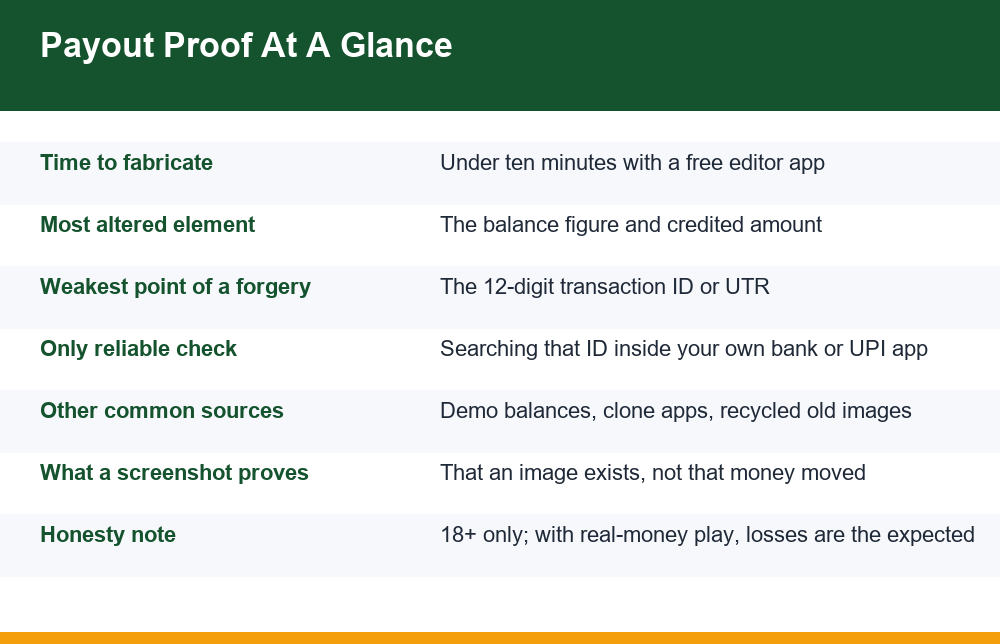
Notice that only the first two involve editing. That is the single most important thing to understand about how a fake payment screenshot gets made: most of them are not edited, so looking for signs of editing will miss most of them. The same logic applies to the way promotional gift codes are dangled as proof of generosity — the code is often real and the credit is often real, while the condition attached to withdrawing it is the part left out of frame.
7 Ways to Spot a Fake Payment Screenshot
These checks are ordered roughly from quickest to most decisive. The first six narrow things down. The seventh is the one that actually answers the question, and the rest of this page expands on it.
| # | Check | What you are looking at | Why it matters |
|---|---|---|---|
| 1 | Digit alignment and kerning | Spacing between numerals in the amount, and whether the digits sit on the same baseline as nearby text | Edited numbers are frequently a fraction off in weight, size or vertical position compared with untouched text in the same screen |
| 2 | Font mismatch | Whether the amount uses exactly the same typeface as labels around it | Editor apps substitute a near-match font; the amount can look subtly bolder, rounder or narrower than the rest |
| 3 | Arithmetic consistency | Whether the credited amount plus the previous balance equals the new balance shown | Forgers change one figure and forget the others, leaving totals that do not add up |
| 4 | Timestamp logic | Date, clock time, day of week, and the phone’s own status bar clock at the top | A credit stamped at a time that contradicts the status bar, or a date that falls on a different weekday than claimed, gives it away |
| 5 | Crop boundaries | Missing account holder name, missing reference line, missing running balance, missing status label | What was removed is usually more informative than what was left in |
| 6 | Interface version | Whether the app layout matches the current version of that app | Template tools and old recycled images reproduce interfaces that have since been redesigned |
| 7 | Transaction ID lookup | Searching the reference number inside your own bank or payment app | This is the only check that distinguishes a real transfer from a convincing picture of one |
Checks one and two are worth doing with the image zoomed to maximum on your own screen rather than glanced at in a chat thread. Doctored digits tend to survive casual viewing and fall apart under magnification, because the person editing them matched the font by eye at normal size. Look specifically at the rupee symbol and the comma separators, which are the characters most often rebuilt by hand and most often slightly wrong.
Check three costs nothing and catches a surprising number of forgeries. Many notification and statement screens show both the transacted amount and the balance afterwards. Inflating the credited figure without recalculating the balance is the most common single error in a fake payment screenshot, because the forger is focused on the number that impresses you and not the number beside it. If the arithmetic does not close, you are finished — no further checks required.
Check four rewards patience. Phones display their own clock in the status bar at the top of every screenshot, and a forger editing the body of a notification rarely thinks about the strip above it. Compare the two. Then compare the date against the day of the week, if the screen shows one, and against the claim being made around the image — a payout described as “this morning” sitting on a three-week-old timestamp is a different story from the one being told.
Check five deserves more weight than people give it. Ask yourself what a genuinely proud winner would crop out. Nothing, usually. Real screenshots from real people tend to be sloppy: full screen, status bar included, notification shade half pulled down, name visible. A proof image that has been tidied into a neat rectangle containing only the amount and a tick has been curated for an audience, and curation is a decision someone made for a reason.
Check six is the one most people skip, and it is free. Payment and banking interfaces change — buttons move, colours shift, fonts get replaced, labels get reworded. Open the same app on your own phone and put the two side by side. A notification screen that does not match the current layout came either from a template tool built against an older design or from an old screenshot being passed off as recent. Neither explanation helps the sender.
Transaction ID Verification: The Check That Settles It
Every completed bank or UPI transfer carries a reference number — commonly a twelve-digit transaction ID or UTR. That number exists in the banking system independently of any image, which is exactly what makes it useful. You cannot verify it by staring at the screenshot. You verify it by searching for it somewhere the sender does not control.
- Open your own banking app or UPI app — not a link, not a web page someone sent you, and not an app the sender recommends installing.
- Go to transaction history or passbook, and use the in-app search for the reference number from the screenshot.
- If the transfer is claimed as incoming to your account, the ID should appear in your own history. If it does not appear, no money reached you, whatever the image shows.
- Cross-check the amount, the date and the counterparty name against the screenshot. Any mismatch on any of the three is a mismatch, not a rounding error.
- If the sender claims a transfer to a third party, remember you cannot verify that at all. Only the account holder can look up their own history, which means third-party proof is unverifiable by design.
- If the reference number is blurred, cropped, partially covered or “hidden for privacy”, treat that as the answer. The ID is the least sensitive field on the screen.
That last point is where most arguments end. People who send genuine proof will read out the reference number without hesitation, because it reveals nothing private. People sending fabricated proof invent reasons not to: privacy, bank policy, a claim that the number changes, a claim that only their app can show it. None of those reasons are real, and the reluctance itself is the signal. The same evasive pattern turns up across the broader family of UPI-based payment scams, where a plausible-sounding excuse is always offered for the one check that would settle things.
Two further cautions. Do not accept a screenshot of a transaction ID lookup as verification — that is just a second image, and a second image is no stronger than the first. And never install an app, open a “verification portal” or enter your UPI PIN because someone asked you to confirm their payment. Verifying a credit to your own account never requires a PIN, a code or a new app. If a verification process demands any of those, the verification is itself the trap.
It is worth being clear about what the lookup can and cannot do. A reference number that appears in your own history with matching details tells you a transfer settled into your account, which is the strongest thing any check here can establish. A number that does not appear tells you either that nothing arrived or that the number was invented, and from your position the two are indistinguishable and equally conclusive. What the lookup cannot do is confirm anything about anyone else’s account, which is why every claim of the form “I was paid out yesterday” is permanently unverifiable no matter how cooperative the sender seems.
Demo Balances, Clone Apps and Recycled Images
The unedited forgeries are the hard ones, and demo balances head that list. A practice or trial mode shows a figure that behaves like money on screen while being nothing of the sort. Screenshot it and every forensic check you can apply to the image comes back clean: the fonts match because they are the real fonts, the arithmetic closes because the software did the maths, the interface is current because it is the current app. Editing-detection cannot touch this, because nothing was edited.
Clone and look-alike apps extend the same idea. A near-copy of a familiar interface, distributed outside normal app stores, can display any balance its operator wants. Someone screenshotting a withdrawal from such an app may not even know the figure is decorative. The image spreads honestly, from their point of view, and lands in your chat as evidence.
Recycled images are the laziest route and still the most widespread. One authentic screenshot, posted in 2023, now circulates under hundreds of different names. Because it is authentic, every check against the image passes. Only the attribution is false. A reverse image search occasionally catches these, though compression and recropping defeat it more often than not. The reliable tell is contextual rather than technical: ask the sender something only the real account holder would know, such as which day of the week that date fell on, or what the balance was before the credit. Fabricated ownership of a real image collapses fast under one specific question.
There is a fourth variant worth naming because it fools careful people. A deposit screenshot is sometimes presented as a withdrawal screenshot. Money going into a platform and money coming out of one produce visually similar notifications, and the direction indicator — a small arrow, a word like “debited” or “credited”, a counterparty name — is the one element a crop removes most naturally. Before judging the fonts or the totals, establish which way the arrow points, because an inbound transfer to a platform proves only that someone paid money in.
Put together, these routes explain why image analysis alone is a losing strategy. You can become very good at spotting a doctored fake payment screenshot and still be fooled daily by proofs that were never doctored at all. Verification has to happen outside the image.
Why Groups and Sellers Post Winning Screenshots
It helps to be blunt about what the proof is for. Nobody posts payout images out of enthusiasm. They are posted because they shorten the distance between a stranger seeing a channel and that stranger paying for something — a subscription, a “VIP” tier, a referral deposit, a signal service. The screenshot is the sales material, and in most cases it is the only sales material, because there is no product to describe.
Understanding the economics removes the mystery. A channel that charges for access earns from the number of people who join, and nothing else. It does not matter to the channel whether members win or lose, which is why the advertised results are never audited and why losing sessions are never posted. Deleting the misses and keeping the hits produces a flawless record from random outcomes, and when there are not enough hits, images get made. Our own look at how paid prediction groups actually generate revenue traces the same pattern: the money comes from the fee, not from the forecasting.
There is a structural reason no amount of proof could be meaningful. The games these channels claim to predict are built with a fixed margin in favour of the house. Over enough rounds that margin decides the outcome regardless of any pattern, system, staking plan or signal. So even if a payout image were verified down to the last digit, it would show one person’s one outcome on one day — which tells you nothing about what happens to anyone else, and nothing about what happens to that person over the following month. This site’s position is simple and it does not change: no system beats the margin. Real-money play is for adults only, and losses are the expected outcome rather than the unlucky exception.
Seen that way, the volume of proof becomes a warning sign in itself. A service with genuine value does not need to post forty screenshots a week. The posting rate is a measure of how much persuasion the offer requires, and heavy persuasion is a property of weak offers.
Mistakes People Make When Reviewing Proof
Most people who get caught were not careless. They applied a check, got a reassuring answer, and stopped. These are the specific places that happens.
- Treating volume as verification. Forty screenshots from forty accounts is one claim repeated forty times, not forty independent claims. The accounts cost nothing to create.
- Accepting a video instead. A screen recording is a sequence of images and is no harder to stage than a still. Scrolling through a balance on camera proves only that the camera saw a screen.
- Letting a partial ID stand in for a full one. First four and last four digits are not a reference number. A partial ID cannot be searched, which is usually the reason it was partially shown.
- Checking only for editing artefacts. Demo balances, clone apps and recycled images produce artefact-free screenshots. A clean image is not a verified one.
- Confusing a credit notification with settled money. Pending, reversed and failed transfers all generate on-screen credits. Settlement is a separate event from notification.
- Verifying inside the sender’s environment. Any check performed in an app, link or portal supplied by the person being checked is not a check. The environment has to be yours.
- Paying a small amount to test. A small first payment is not a test, it is the first instalment. Its purpose is to move you from sceptic to customer, after which refusing the larger request feels inconsistent.
- Assuming a real person means a real payout. Voice notes, selfies and video calls establish that a human is involved. They say nothing about whether money ever moved.
- Reading agreement in the group as corroboration. Replies congratulating a winner cost one tap and tell you nothing about the image. In a channel the operator controls, the audience reaction is part of the material.
If you want a single rule to carry away from all of it: never let the person whose claim you are testing supply the means of testing it. Every durable version of this deception survives on that one substitution.
If You Already Sent Money: Step by Step
If a fabricated proof has already cost you money, speed matters more than anything else you do next. Funds moving through payment rails can sometimes be held while they are still in transit, and that window is short — hours, not days. Everything below is about acting inside that window rather than assembling a perfect case afterwards.
- Stop all further payments immediately, including any “release fee”, “tax”, “unlock charge” or “verification deposit” being requested to free up a balance. Every one of those is a further loss, not a recovery.
- Contact your own bank or payment provider through the number printed on your card or inside your official app, and report the transfer as fraudulent. Use your own contact route, never a number sent to you in chat.
- Collect what you actually have: your own transaction references, the dates and amounts you sent, the account or UPI handle you sent to, and screenshots of the conversation including the proof images themselves.
- Report it through the official national channel for online financial fraud. India’s National Cyber Crime Reporting Portal takes complaints of this kind at the government’s cybercrime reporting portal, and a dedicated helpline number operates for urgent financial cases.
- Change the passwords on any account the person had partial access to, and revoke any app permissions or device pairings you granted during the exchange.
- Keep the chat. Do not delete the thread, block before exporting, or leave the channel in frustration. The conversation is the record of what was promised and shown.
Two expectations worth setting honestly. Recovery is possible but not common, and it depends almost entirely on how quickly the transfer was flagged. And the person who sent the fake payment screenshot will often re-approach you — sometimes as a new account offering to recover the lost amount for a fee. That second approach is the same operation, and the fee is the product.
Finally, tell someone. The isolation around this kind of loss is not incidental; these approaches are structured to make people feel too foolish to mention it, which is what allows the same image to work on the next person. Naming it out loud, to a friend or in the group where you first saw the proof, removes more of the mechanism than any amount of pixel analysis ever will.
Frequently Asked Questions
How can I tell if a payment screenshot is fake?
Check the image first and the banking record second. On the image, zoom in and look for digits that differ in font, weight or baseline from surrounding text, a credited amount that does not reconcile with the balance shown, a timestamp that contradicts the phone’s own status bar clock, and crops that remove the account holder name or reference line. Then do the check that actually settles it: take the transaction reference from the screenshot and search for it in your own banking or UPI app’s history. If it is not there, no money reached you. Be aware that a clean-looking image is not a verified one, because demo balances, clone apps and recycled screenshots are not edited at all and so pass every visual test.
Can UPI payment screenshots be edited?
Yes, easily, and editing is only one of the methods. Ordinary photo editors are enough to change an amount, and template tools exist that reproduce payment-app notification screens with blank fields to fill in. Beyond editing, a practice or demo balance produces an untouched screenshot of a meaningless figure, a look-alike app can display any number its operator chooses, and a genuine old screenshot can simply be forwarded by someone claiming it as their own. The practical conclusion is that no screenshot of any payment app should be treated as evidence of a transfer, regardless of how authentic it looks.
Why do Telegram groups post winning screenshots?
Because the screenshots are the sales pitch. Channels that charge for access, subscriptions, VIP tiers or referral deposits earn from the number of people who join, not from whether members win, so the images exist to shorten the gap between a stranger arriving and a stranger paying. Losing results are deleted and winning ones kept, which turns random outcomes into a flawless-looking record, and when the real hits run short, images get manufactured. A high posting rate is a measure of how much persuasion the offer needs rather than evidence that it works.
Does a screenshot prove money was actually transferred?
No. A screenshot is a picture of pixels, not a banking record. Nothing inside an image links it to a bank’s ledger, and nothing about it is signed or independently checkable. Even a completely genuine screenshot proves only that a phone displayed something at some moment: it cannot establish whose account it was, whether the transfer settled, or whether it was reversed, bounced or cancelled shortly afterwards. Pending and failed transfers both generate on-screen credit notifications, so a credit appearing on a screen and money arriving in an account are two separate events.
How do I verify a transaction ID is real?
Open your own banking or UPI app — not a link, a portal or an app the other person suggests — go to transaction history or passbook, and search for the reference number, usually a twelve-digit transaction ID or UTR. If the number appears, cross-check the amount, date and counterparty name against the screenshot; any mismatch is a mismatch. If it does not appear, the transfer did not reach you. You cannot verify a transfer between two other parties at all, since only the account holder can search their own history.
If the reference number is blurred, partial or withheld “for privacy”, treat that as your answer: the reference number is the least sensitive field on the screen, and reluctance to share it is the signal. Never enter a UPI PIN or install anything to confirm an incoming payment.