Casino KYC verification is the identity check that sits between a balance shown on screen and money actually landing in a bank account, and the honest truth is that most rejections have nothing to do with suspicion. They happen because a photo was blurry, a corner was cropped off, a flash washed out a date of birth, or the name on an ID did not match the name typed into the signup form months earlier. Pages written by affiliates tend to skip this part, because the fix is boring and sells nothing.
What follows is a neutral breakdown of what gets asked for, the eight failure causes behind most refusals, and how to put together a clean resubmission. 18+ only. Real-money play carries risk and losses are the expected outcome.
Casino KYC Verification Explained in One Minute
Short answer first: casino KYC verification is a document review in which a platform matches three things to each other – who you say you are, where you say you live, and which payment instrument you say is yours. Nothing more complicated than that. A reviewer, sometimes assisted by automated image checks, opens your uploads and asks whether the details on them line up with the details on the account. If all three match and the files are readable, the account clears. If any one of them is unreadable or inconsistent, the submission bounces back.
That framing matters, because it explains why so many rejections feel arbitrary. A reviewer is not judging whether you are honest. They are judging whether they can read the evidence and whether it agrees with itself. A perfectly genuine document photographed badly fails the same way a mismatched one does, and the rejection message is usually the same vague line in both cases.
It also explains why the rejection notices are so unhelpful. The person or system refusing a file is working through a checklist of fields – name, date of birth, document number, expiry, address, account identifier – and marking which ones could not be confirmed. The message you receive is a summary of that outcome, not an explanation of it. Nobody writes you a note saying the glare landed across your date of birth, even though that is frequently what happened.
The practical consequence is that you can fix the overwhelming majority of refusals yourself, in about ten minutes, without any back-and-forth with support. You need better light, a flat surface, the full document in frame, and the correct file type for financial proof. Everything else in this breakdown is detail on those four points.
- Identity – a government photo ID with a readable name, date of birth and expiry date.
- Address – a recent document showing your name at the address held on the account.
- Payment ownership – proof that the account or instrument used for deposits belongs to you.
- Liveness – sometimes a selfie or short video to confirm the ID belongs to the person submitting it.
What Documents Get Asked For
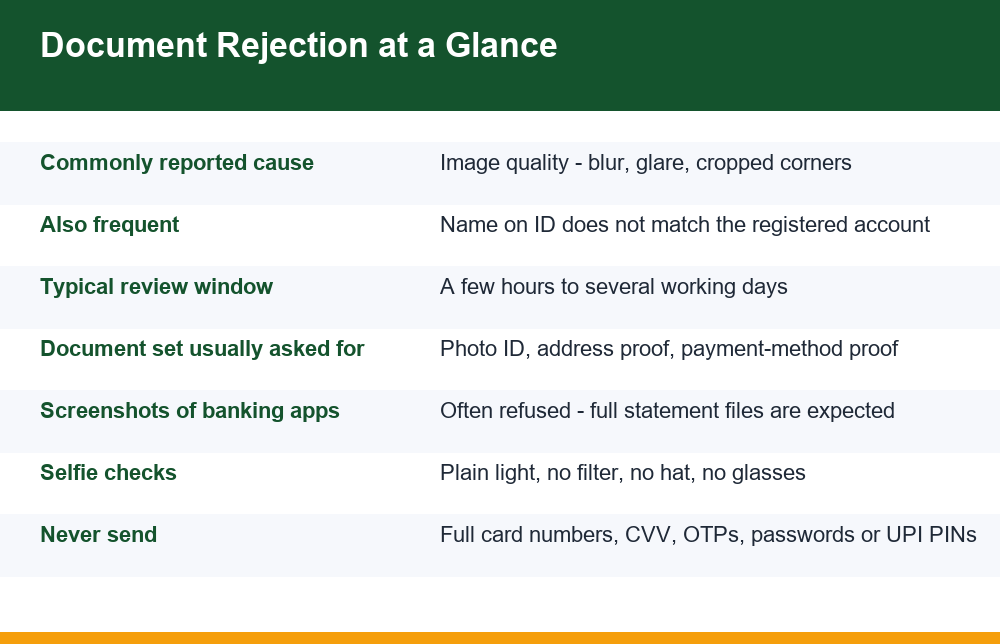
The request list varies by platform, but the categories are remarkably consistent. A casino KYC verification queue is looking for one item from each bucket, not every item in every bucket. Sending six documents when three were asked for slows the review rather than speeding it up, because each extra file is another thing a reviewer has to reconcile.
Below is the typical shape of the request. Treat the right-hand column as the part that actually decides the outcome, because that is where submissions fail.
| Bucket | Commonly accepted | What gets it rejected |
|---|---|---|
| Photo identity | Passport, driving licence, national ID card | Expired document, cropped edges, glare across the photo or date fields, dark or angled shot |
| Address proof | Utility bill, bank statement, official correspondence | Older than the stated window, address differs from the account, name shown as initials only |
| Payment ownership | Bank statement showing name and account, card with middle digits masked | Screenshot of an app dashboard, full card number visible, no name on the document |
| Liveness check | Clear selfie holding the ID, short head-turn video | Filters or beauty mode, hat, sunglasses, backlit window behind you, ID too far from camera |
| Source-of-funds detail | Salary slip, statement showing regular credits | Unexplained large transfers, documents covering the wrong period, partial pages |
Two notes on that table. First, an address proof and a payment proof can sometimes be the same document, if a bank statement carries your name, your address and the account used for deposits. That is often the single most efficient file to send. Second, the masking advice on cards is not optional politeness – a reviewer needs the name and the last four digits, and nothing else. Anyone asking for the full number plus the CVV is not running verification.
A third point is worth adding because it catches people out. The documents are compared against the details already stored on the account, not against each other in isolation. If your profile holds an old address, a recent and perfectly valid bill will still be refused, because the comparison it fails is with your profile rather than with reality. Before you upload anything, open the account settings and read what is actually recorded there – full name spelling, date of birth, address – and note any field that does not match the paperwork you are about to send.
8 Reasons Documents Get Rejected
These eight causes cover most refusals in casino KYC verification. They are listed roughly in the order they tend to come up, and the first three are all variations of the same problem: the reviewer could not read the file.
- Blur and low resolution. A hand-held photo at arm’s length, taken in a hurry, produces soft text. Dates of birth and expiry dates are the first things to go illegible. Rest your phone on something or lean the document against a wall and step closer instead of zooming.
- Glare and flash wash-out. Most ID cards are laminated or holographic, so a direct flash puts a white blob exactly where the data is. Turn the flash off entirely and use indirect daylight from a window to the side rather than behind you.
- Cropped or missing edges. Reviewers are checking the whole document, including borders and machine-readable lines at the bottom. A shot that clips a corner, or a scan where the document overhangs the glass, reads as incomplete. Leave a visible margin of background on all four sides.
- Name mismatch with the registered account. A very common cause, and the one that cannot be fixed by retaking a photo. Covered in its own section below.
- Expired or nearly expired identity document. An ID that lapsed last month is not valid proof today, and some reviewers also refuse documents expiring within the next few weeks. Check the expiry date before you upload, not after.
- Screenshots instead of statement files. A screenshot of a banking app or a payment app’s transaction list is one of the most commonly refused forms of financial proof. Also covered in its own section.
- Address proof that is too old or does not match. Most requests specify a recency window, commonly the last few months. A bill from last year fails even if the address is right, and a current bill at a different address fails even if it is recent. Update the address on the account first, then submit matching proof.
- Edited, filtered or re-saved files. Cropping in an editor, applying auto-enhance, running a document through a scanner app’s “whiten” filter, or converting a photo several times can strip metadata and introduce artefacts that automated checks flag as tampering. Send the original camera file or a straight scan.
Notice what is absent from that list: nothing on it is about you. Seven of the eight are properties of a file or a stored field, and all seven can be corrected in a single sitting. That is the useful thing to hold on to when a refusal arrives with no detail attached, because the instinct in the moment is to assume you have been judged rather than simply misread.
There is a ninth cause worth naming even though it is not a document problem: submitting to an account that was never properly yours in the first place. If someone else registered the account, or it was bought or borrowed, no document set will reconcile, because the identity on the account is not the identity on the ID. That situation is a dead end, and the balance is not recoverable through verification. Keeping one account in your own name from the start is the foundation of keeping a gaming account genuinely secure, and it is also what makes verification uneventful later.
Name Mismatch: The Failure Point People Underestimate
Name mismatch deserves its own section because it is the one rejection cause that people consistently underestimate. In casino KYC verification the comparison is literal: the name stored on the account is compared with the name printed on the document, and a reviewer usually has limited room to interpret differences.
The answer to whether it has to match exactly is: close enough to be unambiguous, and the safest assumption is exactly. Some differences are routinely tolerated, others are not, and the line is not always where people expect it.
- Usually tolerated – a middle name present on the ID but absent on the account, a hyphen or apostrophe rendered differently, extra spacing, or a title such as Mr or Shri appearing on one document only.
- Often questioned – initials on one side and the full given name on the other, a surname and given name in reversed order, or a shortened everyday form of a name instead of the registered form.
- Reliably refused – a different person’s name on the payment proof, a nickname that does not appear on any document, or a name changed after registration with no supporting record.
Reversed name order deserves a particular mention, because it is common across Indian documents and is read as a mismatch rather than a formatting quirk. A passport that prints the surname first, a bank record that stores a father’s or a village name as a surname, and a signup form filled in casual order can produce three different strings for the same person. None of them is wrong. All three can still fail a field-by-field comparison.
The fix is sequencing, not argument. If the account name is wrong or abbreviated, ask support to correct the profile name before uploading, and explain plainly that the ID shows the fuller form. Many platforms will make a correction of this kind on request, because the situation is so ordinary. Uploading first and then asking for a change afterwards puts a rejection on the file and makes the second review more cautious.
One more trap: the name on the payment instrument matters as much as the name on the ID. A deposit funded from a family member’s account will not reconcile with your ID no matter how clear the photos are, and third-party funding is one of the standard reasons a withdrawal stalls indefinitely. If you have used an account that is not in your own name, expect that to surface at verification rather than at deposit.
Bank Statements vs Screenshots Compared
The question of whether a screenshot is acceptable comes up constantly, and the short answer is that it usually is not. The longer answer is more useful, because it explains what a reviewer is actually looking at and lets you judge borderline cases yourself.
A screenshot of a banking or payment app shows a rendered view: a balance, a list of transactions, maybe a masked account number. What it generally does not show is your full name as held by the bank, the account identifier in full, the statement period, and any issuing detail that ties the view to the institution. A statement file – the PDF your bank generates for a date range, or a stamped paper copy – carries all of that in one artefact. That is the difference that decides the outcome.
There are narrow cases where a screenshot passes. If the app’s own statement view renders your full registered name, the account number in its masked standard form, and a defined date range on the same screen, some reviewers will take it. If the screenshot shows only a transaction feed, it will not be accepted regardless of how clearly the deposit appears in it.
Two mechanical points about the file itself. Most banking apps will email a statement as a password-protected PDF, with the password built from a date of birth or a customer number – if you upload that file without noting the password anywhere, a reviewer cannot open it and the submission fails for a reason that has nothing to do with its contents. And do not flatten a statement into a photograph of a screen. A PDF opened and screenshotted is a screenshot again, with the searchable text thrown away.
The reliable approach is to download the statement your bank issues for the relevant period, send the file unaltered, and let it do the work of both address proof and payment proof. This is also the point where verification intersects most directly with cashing out, and the sequencing problems people hit there are the same ones described in this breakdown of the steps a withdrawal actually moves through.
How Long Verification Usually Takes
There is no single number, and anyone quoting one precisely is guessing. Realistically, casino KYC verification on a clean first submission resolves somewhere between a few hours and several working days. Automated image checks can clear a straightforward passport photo in minutes; anything routed to a human reviewer joins a queue.
What reliably stretches the timeline is worth knowing, because almost all of it is within your control:
- Each rejection resets the clock. A second submission does not resume where the first stopped. It re-enters the queue, often behind the previous day’s volume.
- Partial submissions wait. If three documents were requested and two arrive, nothing is reviewed until the third does.
- Peak periods are slower. Review queues lengthen noticeably around major sporting events, when both signups and withdrawal requests spike at once.
- Extra questions add a round trip. A source-of-funds query or an address clarification is a separate exchange, each leg of which may take a working day.
- Weekends and holidays are not review days on most desks, so a Friday evening submission can sit untouched for two days before anyone opens it.
- Verification requested at withdrawal time is slower in practice than verification completed shortly after signup, because the queue it enters is busier and the scrutiny is higher.
The single most effective thing you can do about the timeline is complete verification early, while there is nothing pending. People who wait until they want their money out are the people who experience verification as a delay tactic, when much of what they are feeling is simply a queue plus their own resubmissions.
It is also worth separating two things that get confused: the review of your documents and the processing of a payment. Clearing verification does not mean money moves the same hour. A payout still has its own queue and its own banking rails behind it, so a cleared account and a pending withdrawal can coexist for a while without anything having gone wrong. Knowing which of the two you are waiting on tells you whether there is anything useful to ask support.
Resubmitting Correctly: A Step by Step Checklist
If a submission has already been refused, work through this in order rather than re-uploading the same files with a better-worded message. A second casino KYC verification attempt that fixes nothing simply produces a second rejection and a more cautious reviewer.
- Read the rejection reason literally. “Document not clear” means the image, not your identity. “Details do not match” means the account data, not the photo. The two require completely different fixes, and treating one as the other is the most common wasted attempt.
- Fix the account data first. If the issue is name, address, or date of birth on the profile, get that corrected before uploading anything. Documents cannot win an argument against a mismatched profile field.
- Check the expiry date. If the ID has lapsed, stop here and use a different valid document. Nothing else in the list matters.
- Re-shoot in indirect daylight. Flash off. Document flat on a plain, dark, non-reflective surface. Phone parallel to the document, not angled. Visible margin on all four sides.
- Zoom in and read it yourself. Open the file at full size and read the name, the date of birth, the document number and the expiry date. If you have to squint at any of them, the reviewer will refuse it.
- Replace screenshots with statement files. Download the statement from your bank for the period requested and send it as issued, without cropping or editing.
- Mask only what should be masked. On a card image, cover the middle digits and the CVV. Leave the name and the last four digits visible. Never obscure anything on an identity document.
- Check the file size and format before uploading. Upload forms often cap file size and accept only a short list of formats, and a rejected upload sometimes looks like a successful one. Confirm each file actually appears in the account’s document list afterwards.
- Upload through the platform’s own account area. Not by email, not through a chat link someone sent you, and never to a support contact you found on social media or a messaging app.
- Send the complete set in one go and then wait. Repeated uploads of the same file while a review is open can push the case back to the end of the queue.
One structural point that saves a lot of confusion: verification is tied to the account and the platform, not to you personally. Clearing documents in one place does nothing for another, and the document set asked for can differ meaningfully between product types – which is part of the wider difference explained in this comparison of how casino accounts and cricket IDs differ in practice. Expect to repeat the whole exercise anywhere you register, and factor that into whether registering somewhere new is worth it at all.
What Happens to Money If Verification Is Never Completed
This is the question people search when they are already stuck, and it deserves a direct answer rather than reassurance. If verification is never completed, the balance generally stays where it is – visible, uncashable, and eventually dormant. Deposits are not usually refunded automatically, and winnings attached to an unverified account are not usually released as a goodwill gesture.
What happens next depends on the account rules the platform sets for itself, which commonly allow an inactive balance to be charged a dormancy fee or written off after a defined stretch of no activity. The practical outcome for an unverified account is that the money sits there until one of two things happens: you complete verification, or the balance erodes to nothing over time. Neither of those is a negotiation, and support cannot usually alter either.
There is a harder version of this situation. If the account cannot be verified because it was never in your name, or because the funding came from someone else’s payment instrument, there is no document set that resolves it. That is worth sitting with before depositing anywhere: the verification step is the point at which shortcuts taken at signup become visible, and it is the point at which they cost money.
The honest conclusion to draw from all of this is about sizing rather than process. Money you cannot verify your way to is money you have functionally lost, so the only amount that is safe to deposit anywhere is an amount you could watch disappear without it changing anything. That holds before any question of outcomes on the games themselves, where the margin is built in and losing is the expected result.
If money has left your bank account to a party you cannot identify, or an account has been opened or operated in your name without your involvement, that is a fraud matter rather than a verification matter. Reports in India go through the official National Cyber Crime Reporting Portal, and the first call should be to your bank to flag the transaction. Treat that as separate from any conversation with a platform’s support channel.
Mistakes to Avoid and Privacy Points to Watch
Because casino KYC verification involves handing over identity documents, it is also the moment at which people are most easily exploited. The request itself is ordinary. The way a request arrives is what tells you whether it is real.
A genuine verification request appears inside the account area you log into. It does not arrive as a message on a chat app from someone describing themselves as a verification officer, it does not come with a deadline measured in minutes, and it never requires a payment. Any version of “pay a verification fee to release your withdrawal” is a scam mechanic, described here so you recognise it rather than fall for it. There is no legitimate structure in which you pay money to prove who you are.
The second mechanic to recognise is over-collection. Verification needs a name, an address, a date of birth, a document number and proof that a payment instrument is yours. It does not need your full card number, your CVV, an OTP, your banking password, your UPI PIN, or remote access to your phone or computer. Anyone collecting those is collecting the means to move money, not the means to confirm identity. Hand over one of them and the problem stops being a stalled withdrawal.
A third, quieter mechanic is the redirected upload. Someone contacts you offering to speed up a stalled review and sends a link to a form that looks like the platform’s own. What you are actually doing is posting a full identity set to a stranger. The rule that defeats this costs nothing: upload only through a page you reached by typing the site address yourself and logging in, never through a link that arrived in a message.
Think about where the copies end up on your own devices too. Photographs of an ID sitting in a phone gallery get backed up, synced and occasionally shared by accident, and a chat thread with a document in it stays searchable for years. Keep verification images in one deliberate place, delete the discarded attempts once a submission clears, and avoid sending documents through messaging apps at all.
Finally, keep your own record. Save copies of exactly what you sent, when you sent it, and through which screen, and keep the rejection messages. If a case drags on, a dated record of a complete submission is the only thing that moves a conversation forward, and reconstructing it from memory weeks later never works. That record costs nothing to keep and is the difference between a specific question support can answer and a vague complaint it cannot.
Frequently Asked Questions
Why was my KYC document rejected?
In most cases because the file could not be read rather than because anything was wrong with the document. Blur, flash glare across the data fields, a cropped corner and an angled shot account for a large share of refusals. The other common causes are a name that does not match the registered account, an expired identity document, an address proof outside the recency window, and a screenshot sent where a statement file was expected. Read the rejection wording literally: “not clear” is an image problem you fix by re-shooting in indirect daylight, while “details do not match” is an account data problem you fix by correcting the profile first.
What documents does a casino ask for in verification?
Usually one item from each of three or four categories: a government photo ID such as a passport, driving licence or national ID card; an address proof such as a recent utility bill, bank statement or official correspondence; proof that the payment instrument used for deposits belongs to you; and sometimes a selfie or short video as a liveness check. A bank statement carrying your name, address and account can often satisfy two categories at once. Send what was asked for and no more, since every extra file is another thing a reviewer has to reconcile.
How long does KYC verification usually take?
A clean first submission typically resolves between a few hours and several working days. Automated checks can clear a straightforward ID photo quickly; anything routed to a human reviewer joins a queue. Each rejection restarts the process rather than resuming it, partial submissions are not reviewed until the last document arrives, weekends are not review days on most desks, and queues lengthen noticeably around major sporting events. Completing verification shortly after signup is consistently faster than leaving it until you want to withdraw.
Does the name on my ID have to match my account exactly?
Assume yes. A missing middle name, differing punctuation or a title on one document only is usually tolerated. Initials against a full given name, reversed surname and given name, or a shortened everyday form is often questioned. A different person’s name on a payment proof is reliably refused. If the account name is wrong or abbreviated, ask support to correct the profile before uploading rather than after, because a rejection on file makes the next review more cautious.
Can I use a screenshot of my bank statement for verification?
Usually not. A screenshot of an app’s transaction feed lacks your full registered name, the account identifier, the statement period and any issuing detail tying the view to the bank, and those are exactly the elements a reviewer checks. Some reviewers accept an in-app statement view if it renders the full name, the masked account number and a defined date range on one screen. The reliable approach is to download the statement file your bank issues for the period requested and send it unaltered, without cropping or filters.
What happens to my money if I never complete KYC?
The balance generally stays visible but uncashable. Deposits are not usually refunded automatically and winnings on an unverified account are not usually released as a gesture. What follows depends on the account rules the platform sets for itself, which commonly allow a dormant balance to be charged a fee or written off after a defined stretch of inactivity, so the practical outcome is that the money sits there until verification is completed or the balance erodes. If an account was never in your own name, or was funded from someone else’s payment instrument, no document set resolves it.