SIM swap fraud does not begin with your password being guessed. It begins with somebody persuading a mobile operator to move your number onto a SIM card they control, and from that moment every verification code sent to you arrives with them instead. Email, banking, gaming accounts and anything else secured by a text message all fall in sequence, usually within an hour. The attack needs no technical skill, only persistence and some personal details that are easier to find than most people assume. The seven signs below are the ones that appear before the damage, and the first of them is the only early warning you are likely to get.
How SIM swap fraud actually happens
Someone contacts your mobile operator claiming to be you, says the handset is lost or the SIM is damaged, and asks for the number to be moved to a new card. The operator asks security questions. If the caller can answer them, the number moves.
The details needed are rarely secret: date of birth, address, perhaps a few recent call destinations or the last payment amount. Most of that can be assembled from social media, a data breach or an earlier phishing message. Occasionally the attacker does not need any of it, because a member of staff has been bribed or deceived directly.
Why gaming accounts are targeted early
Accounts holding a balance and verified by a phone number are attractive precisely because they are quick to empty and slower to notice than a bank account. Many are also linked to a payment method that can be used for a deposit and a withdrawal in the same session.
The seven warning signs
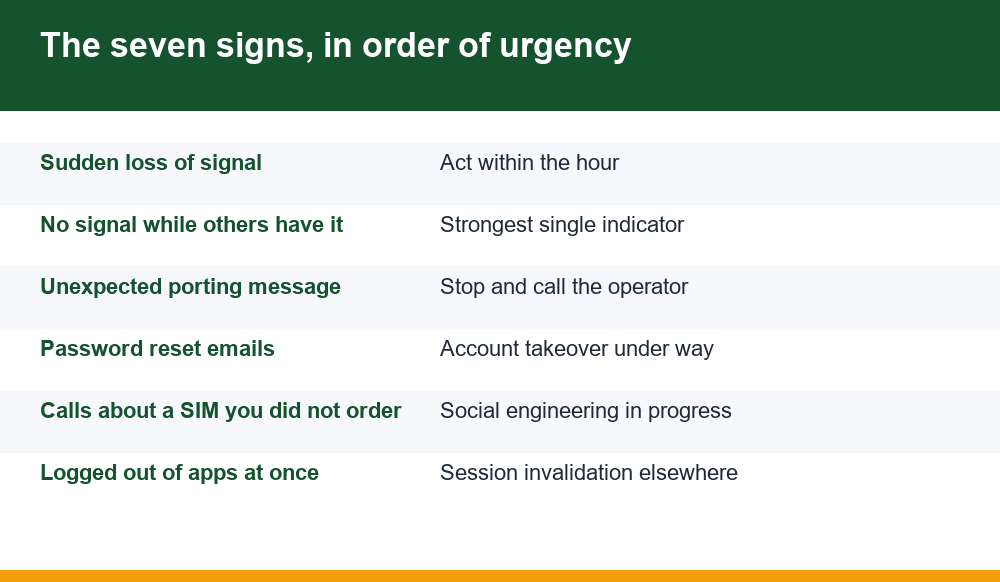
Six of these appear after the swap and one appears before it. They are ordered by how much time you have left when you notice them.
- Your phone loses signal and does not get it back. No bars, no mobile data, calls failing. This is the swap completing.
- Other phones on the same network work fine. Rules out an outage and leaves very few explanations.
- A message or email about a SIM change or port you did not request. Sometimes arrives just before the switch.
- Password reset emails you did not trigger. The attacker is already working through your accounts.
- An unexpected call asking you to confirm details or read a code. Groundwork for the swap rather than the swap itself.
- Being logged out of several apps at once. Sessions invalidated as credentials change elsewhere.
- A new device notification from an account you have not touched. Confirmation somebody else is inside.
The first two together are close to conclusive. A phone that loses service while the handset beside it works normally has either broken in an unusual way or had its number moved, and the second is more likely than the first.
The hour that decides the outcome
Everything about this attack is time-sensitive, and the window is short. Once the number is live on the attacker’s SIM, they begin resetting passwords, and each account recovered gives them material for the next.
People lose crucial time to a reasonable assumption: that the phone is faulty. Restarting it, removing and reinserting the SIM, waiting to see if service returns. Thirty minutes spent on that is thirty minutes the attacker spends inside your email.
The rule worth remembering is simple. If your phone loses service and another phone on the same network has not, treat it as a security incident first and a hardware fault second. Checking takes one call from another phone, and the cost of being wrong in that direction is nothing.
Why SMS codes are the weak link
Two-factor authentication by text message is far better than no second factor, and it is the weakest of the common options, for exactly the reason this attack exists.
An SMS code is tied to a phone number, and a phone number is an account held with a company that can be talked into moving it. An authenticator app generates codes on the device itself, with no number involved and nothing for an operator to reassign.
| Second factor | Resistant to SIM swap? |
|---|---|
| SMS code | No. This is the attack. |
| Authenticator app | Yes. Codes are generated on the device. |
| Hardware security key | Yes, and resistant to phishing as well. |
| Email code | Only if the email itself is not SMS-recoverable. |
That last row is the one people miss. Moving a gaming account to an authenticator app achieves little if the email address behind it can still be reset by text, because the attacker simply goes around the side.
Defences that genuinely work
Three measures do most of the work, and the first is the one almost nobody has set.
Add a port-out PIN or account passcode with your mobile operator. Most networks offer a separate code required before any SIM change or number transfer, and it defeats the entire attack because the social engineering no longer has anything to beat. It takes one phone call to set up.
Move your most important accounts off SMS verification, starting with email, because email is the master key to everything else. Then banking, then anything holding a balance.
Reduce what is findable about you. Date of birth, address and mother’s maiden name are standard security questions and standard social media content. Where a service lets you invent the answers to security questions rather than answering honestly, invent them and store them somewhere secure.
Number hygiene most people skip
Beyond the three main defences, a few habits reduce the blast radius if a swap does succeed.
- Keep a second number, on a different network, registered to nothing important but usable to call for help
- Do not use your main number as the public contact on marketplaces or classified listings
- Check which accounts list your number as a recovery method and prune the list
- Turn on account alerts by email as well as SMS, so one channel surviving is enough
The last point matters more than its position suggests. If every alert you receive goes to the channel the attacker has just taken over, you learn about the incident when the money is gone. An email alert arriving on a laptop is a parallel route that a SIM swap does not touch.
We cover the account-side equivalents of these habits in our guide to recovering access to a gaming account, which deals with what happens once a login has already been lost.
If it has already happened
Order matters here more than speed, because the wrong first step wastes the window.
- Call your mobile operator from another phone and report a suspected SIM swap. Ask them to suspend the number and reverse the transfer.
- From a device you trust, change your email password first. Everything else can be reset through email, so it is the account that must be recovered first.
- Remove SMS as a recovery method on each account as you regain it, replacing it with an authenticator app.
- Contact your bank directly, using the number on your card rather than any number sent to you.
- Take screenshots of transactions, messages and timestamps before anything is cleaned up.
Email before banking is counterintuitive and correct. While the attacker holds your inbox, every password you change can be undone by a reset link arriving there, and you will spend the afternoon locking doors behind someone already in the house.
Getting accounts back afterwards
Recovery is slower than the attack by a wide margin, and documentation is what shortens it. Platforms are cautious about returning accounts, understandably, because the person claiming to be the victim is sometimes the attacker.
Have ready: the date and approximate time service was lost, the reference number from your mobile operator, screenshots of unauthorised transactions, and any device or location notifications showing access you did not make. A claim supported by timestamps is handled very differently from one supported by assertion.
Expect gaming accounts to be among the slower recoveries, since they frequently have fewer support staff and more fraud attempts than a bank. Where a balance has been withdrawn to an account that is not yours, that detail is worth stating explicitly and early, because it is the clearest evidence available that the activity was not yours.
Finally, once the number is back, go through every account that used it and check what recovery methods are listed. Attackers frequently add their own email or a secondary number while they have access, which leaves a door open long after the obvious damage is repaired. That clean-up is tedious, easy to postpone, and the reason a minority of victims are hit twice.
Why operators rarely catch it for you
It is reasonable to ask why mobile operators cannot simply stop this, given that they are the ones performing the transfer. The answer is partly structural and worth understanding, because it tells you where to put your own effort.
A SIM swap is a routine, legitimate transaction. Phones are lost, SIMs break, people upgrade, and networks process large numbers of genuine requests every day. The staff handling them are measured on resolving calls, not on refusing them, and a customer who cannot get their number back after losing a handset is a complaint that reaches management far faster than a fraud that surfaces weeks later.
That incentive structure explains why the port-out PIN matters so much. It converts a judgement call into a binary check, and removes the possibility of a persuasive caller talking past a security question. It also explains why the protection is opt-in rather than default: a mandatory code generates lockouts, and lockouts generate complaints.
Practically, this means the defence sits with you rather than with the network. Setting a transfer PIN, moving important accounts off SMS verification and keeping an email alert channel that a swap cannot touch are all things nobody will do on your behalf, and together they cost about twenty minutes once.
One final habit, for anyone who has read this far and intends to do nothing today. Set a calendar reminder for a quiet evening this month and use it to make one phone call to your mobile operator asking for a port-out PIN. That single action defeats the ordinary version of this attack outright, and it is the only item on this page that cannot be undone by a convincing stranger on a telephone.
Frequently Asked Questions
What is the first sign of SIM swap fraud?
Sudden and sustained loss of mobile signal, particularly when another phone on the same network still works. That combination is close to conclusive. Treat it as a security incident rather than a hardware fault, because the cost of checking is one phone call.
How do attackers get past operator security questions?
The answers are usually findable. Date of birth, address, recent payment amounts and call destinations can come from social media, an old data breach or an earlier phishing message. In some cases staff are deceived or bribed directly, and no details are needed at all.
Is an authenticator app really safer than SMS?
For this attack, yes. Authenticator codes are generated on the device itself, with no phone number involved and nothing an operator can reassign. The caveat is that it achieves little if the email behind the account can still be reset by text message.
What should I do first if I think I have been swapped?
Call your mobile operator from another phone and ask them to suspend the number. Then change your email password before anything else, because email is the recovery route for everything else and resets will keep undoing your work while the attacker holds it.
Can a port-out PIN stop it completely?
It defeats the usual method, because the social engineering no longer has anything to beat without that code. It is not absolute, since insider access bypasses it, but it is the single most effective step available and it takes one call to your network to set up.