You tapped withdraw three days ago, the amount vanished from your usable balance, and nothing has reached your bank — which is usually the moment people start looking up how the cricket id withdrawal process really works. The pages that rank for this search are mostly built to sell you an account somewhere, and they tend to say the same thing: instant cashouts, 24×7 payouts, no delays. That is marketing copy, not a description of a pipeline.
A withdrawal request on a cricket-ID or casino-ID style account passes through several distinct checkpoints before any money moves, and a request sitting in pending is usually parked at one specific checkpoint rather than lost. This breakdown maps every stage, names what genuinely holds a payout up, and separates the parts you can fix from the parts you cannot. Nothing here is advice on how to play. 18+ only, real-money play carries risk, and losing is the expected outcome over time.
What Actually Happens After You Tap Withdraw
The first thing worth understanding is that pressing the withdraw button does not send money anywhere. It creates a request record on the account. Your balance usually drops immediately, because the requested amount is moved into a reserved or pending state so you cannot wager it while the request is open. People read that balance drop as “the money has been sent” and then panic when nothing arrives. The two events are unrelated.
From that point the request is an internal ticket. It has a status, a timestamp, and a queue position. Depending on the setup, it may be reviewed automatically by rules, manually by a desk operator, or both. Only at the very end of that chain does anything touch a payment rail — a UPI handle, a bank transfer, a wallet credit. So when you are told “it is with the bank”, that is frequently untrue in the early stages, because the bank has not yet seen a single instruction.
Understanding this split matters because it changes what you do. If the request has not reached a payment rail, your bank cannot help you and there is no transaction reference to chase. If it has reached a payment rail and failed, there is a reference, and that reference is the single most useful thing you can ask for. Asking “has a transfer actually been attempted, and what is the reference?” is a far better question than “where is my money?”, because the first one has only two possible honest answers and the second one can be deflected indefinitely.
- Balance reserved — amount is held, not sent, and cannot be wagered.
- Request status — pending, under review, processing, rejected or paid.
- Payment reference — only exists once a transfer has genuinely been attempted.
- Reversal — a rejected request normally returns the amount to the usable balance, not to your bank.
One more structural point: on many of these accounts you do not hold the account directly. It was opened for you by an intermediary who handles credits and debits on your behalf. That adds a human layer between your request and the actual platform, and that layer is where a large share of unexplained delays lives. The intermediary may be slow, may be juggling other people’s balances, or may simply have stopped answering. None of that is visible to you from the account screen, which is why silence feels identical to a technical delay even though the two need completely different responses.
If you cannot even reach the person who set up your account, you have a different problem — an access problem — and the steps for recovering control of a cricket ID login are the place to start rather than resubmitting requests into silence.
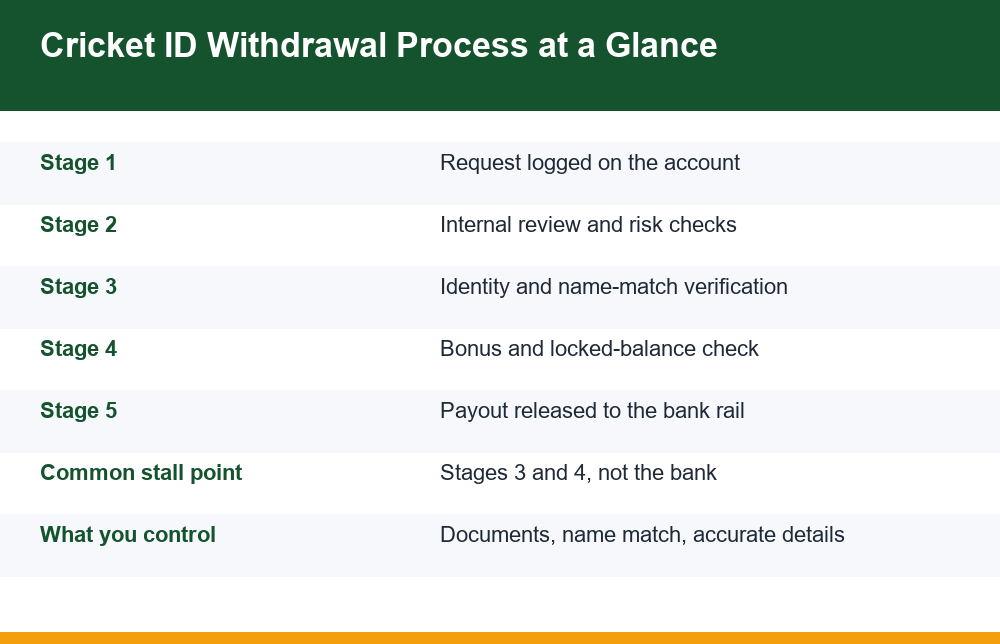
The Cricket ID Withdrawal Process Broken Into Five Stages
Stripped of branding, the cricket id withdrawal process looks broadly the same everywhere, because the checks being run are the same checks. Here is the pipeline, in order, with what each stage is actually doing and what you can influence at that point.
| Stage | What happens | Typical dwell time | Can you influence it? |
|---|---|---|---|
| 1. Request logged | Amount reserved, ticket created with a status | Instant | Yes — accuracy of amount and payment details |
| 2. Internal review | Pattern and risk rules run; flagged items go to a human | Minutes to a day | No, beyond having a clean account history |
| 3. Identity verification | Documents and name match checked against the account | Hours to several days | Yes — submit clear, matching documents once |
| 4. Balance eligibility | Bonus locks, turnover conditions, minimums applied | Instant to hours | Partly — you can check terms before requesting |
| 5. Payout execution | Instruction sent to a payment rail; credit or failure | Minutes to 2 working days | No, but you can ask for the reference |
Two observations about this table are worth more than any promise of instant payouts. First, the stages with the widest time ranges — identity verification and payout execution — are the two you have the least day-to-day control over once a request is in flight. Second, the only stages where your own actions change the outcome are the ones that happen before and at the moment you submit: having verification already complete, knowing what portion of your balance is actually withdrawable, and entering payment details that match your own name.
It is also worth noticing what the table does not contain. There is no stage at which a payout is accelerated by asking more often, no stage at which a larger balance moves faster, and no stage at which anything you say in a chat window changes the order of the queue. The sequence is mechanical. That is a slightly deflating conclusion, but it is more useful than the alternative, because it tells you where to spend effort — on preparation and documentation — rather than on pressure.
This is also why “request again and it will go faster” is wrong. A second request does not overtake the first in the queue. It creates a second ticket competing for the same reserved funds, and on many setups it triggers a fresh risk flag precisely because duplicate requests are a pattern associated with account takeover. The practical effect of resubmitting is usually a longer wait, not a shorter one.
Note the step count people argue about. Counted as back-office stages the cricket id withdrawal process has five; counted as user actions the sequence runs to seven: complete verification, confirm withdrawable balance, check the minimum and any fee, enter matching payment details, submit once, record the request ID, then wait out the stated window before escalating. Those seven are the only levers you hold, and the first two of them are the ones almost nobody does in advance.
Why Your Withdrawal Sits in Pending
“Pending” is not one condition. It is a label covering at least six different states, and the honest answer to “why is mine pending” depends entirely on which one you are in. The affiliate pages ranking for this query rarely make that distinction, because distinguishing it would mean admitting that delays are normal and structural rather than exceptional.
- Queue position — nothing is wrong, the request simply has not been picked up yet. Common at weekends, during big tournaments, and in the hours after a major match ends.
- Risk flag — something about the pattern, such as a large request shortly after a deposit, routed it for manual review.
- Verification incomplete — documents are missing, expired, unreadable, or the name does not match the payment destination.
- Balance not fully eligible — part of the amount is tied to a bonus or unmet turnover condition.
- Payment rail failure — the transfer was attempted and bounced, often on a wrong account number or a bank-code mismatch.
- Intermediary sitting on it — the request never reached the platform because the person managing the account has not forwarded it.
The first five have observable symptoms. A queue delay clears on its own and the status changes. A verification hold almost always comes with a request for documents, even if that request landed in a chat window you stopped reading. A rail failure produces a reference number and a reason code. A bonus lock shows up as a difference between your total balance and your withdrawable balance. In every one of those cases there is something to look at, which means there is something to check before you conclude the worst.
The sixth has no symptoms except silence, and it is the one to take seriously. If no status ever changes, no document is requested, no reference is produced, and messages stop being answered, you are not waiting on a process — you are waiting on a person who has stopped responding. At that point, more waiting does not improve your position, and the only useful moves are documentary ones: preserve the evidence and report it through a formal channel rather than continuing to negotiate in a chat thread.
A short diagnostic helps here. Has the status text changed at all since you submitted? Has anyone asked you for a document? Does the account show a total balance and a separate withdrawable balance, and do they differ? Is there a reference number anywhere against the request? Four answers of “no” point at the sixth state rather than any of the first five, and that is the point to stop treating the problem as a technical queue.
There is one pattern that should end the conversation immediately. If a stalled withdrawal is followed by a demand for money — a “release fee”, a “clearance charge”, a “server charge”, a top-up to “unlock” your own balance — that is not part of any payout pipeline. No genuine payment stage asks the recipient to pay in order to receive. This mechanic is common enough to be worth reading about in detail before it happens to you, which is why we break down the advance-fee pattern used on blocked withdrawals separately. Paying once almost never ends it; it marks you as someone who pays.
KYC Holds: The Most Common Single Cause
If you had to pick one reason a first withdrawal is stuck, verification would be it. Many accounts let you deposit and play with minimal checks and only run identity verification at the point of cashing out. The result is predictable: people reach the withdrawal stage believing their account is fully set up, then hit a wall of document requests they were not expecting, at the worst possible moment emotionally.
A verification hold is usually about matching rather than suspicion. The checks are looking for consistency across three things: the name on the account, the name on the identity document, and the name on the payment destination. Any mismatch between those three — a shortened first name, a missing surname, an initial expanded in one place and not another, a payment handle belonging to a relative — is enough to park the request until a human resolves it.
- Name mismatch — the single biggest cause, and the hardest to fix after the fact.
- Third-party payment destination — a payment handle or account in someone else’s name will generally not clear.
- Unreadable uploads — glare, cropping, blur, or a document photographed at an angle.
- Expired document — accepted at signup, rejected later.
- Address or date-of-birth conflict — different values entered at signup versus shown on the document.
What you can do is narrow. Submit each requested document once, as a clear flat image, with every corner visible, and make sure the payment destination is in your own name. Do not send documents repeatedly into different channels; multiple versions of the same document arriving from different places is itself a review trigger. And be careful about who is asking — a request for documents should come through the account interface or the account’s established support channel, not from a new number messaging you out of the blue. The way identity verification is actually run on these accounts is worth reading before you upload anything, because the difference between a legitimate document request and a harvesting attempt is not always obvious in the moment.
It is also worth separating two things that feel identical. A hold caused by verification does clear, often within a couple of working days of the last correct document landing, and it clears without you doing anything further. A hold caused by an unfixable mismatch — the account was opened in a name that is not yours, or the only payment destination you have belongs to someone else — may not clear at all. That is a structural problem no amount of follow-up solves, and recognising which of the two you are in saves weeks of pointless messaging.
Bonus Locks, Turnover Conditions and Locked Balance
The second large category of stalled payouts has nothing to do with identity. It is that the balance you are trying to withdraw was never fully withdrawable in the first place. This is the part of the cricket id withdrawal process that is most often misunderstood, because the number on screen looks like one number.
Promotional credit typically arrives with conditions attached. Until those conditions are satisfied, the credited amount — and sometimes anything derived from it — is locked. A withdrawal request against a balance that includes locked funds does not always fail cleanly with a clear message; it can simply sit, or be partially paid, or be rejected with a generic status. Reading the terms attached to any credit before accepting it is the only point at which this is preventable.
How to tell whether a bonus is holding your payout
- There are two different figures displayed — total balance and available or withdrawable balance.
- A promotional credit was accepted at some point, whether or not you asked for it.
- The rejection or hold message mentions turnover, rollover, wagering, or conditions not met.
- A partial amount paid out and the remainder stayed behind.
- The withdrawable figure moves when you wager, rather than only when you win or lose.
The honest framing here is uncomfortable but useful: a condition attached to promotional credit exists to keep that credit in play. The structure is designed so that the credit is wagered, and because the house margin applies to every wager, the expected result of working through a turnover requirement is a smaller balance, not a larger one. That is arithmetic, not pessimism. It is also why treating locked promotional credit as money you own leads to the specific disappointment of a withdrawal that will not clear.
Separately, minimums and limits apply. A request below the stated minimum may be rejected outright. A request above a daily or weekly cap may be split or partially processed. A method-specific fee may be deducted so that the credited amount is smaller than the requested amount, which reads as a partial failure when it is simply a charge. None of these is a malfunction, and none is usually explained up front, which is why checking the stated minimum, cap and fee before submitting removes a whole class of confusion for free.
How Long a Withdrawal Normally Takes
There is no single honest number for the cricket id withdrawal process, and anyone quoting one is quoting a best case. What can be described is the shape of the distribution. A request on a fully verified account, against a clean withdrawable balance, inside normal hours, with correct payment details, commonly completes within the same working day. Everything that deviates from that description adds time.
The realistic bands look roughly like this. A first-ever withdrawal takes longest, because verification runs for the first time — plan for several working days rather than hours. Subsequent withdrawals on a verified account are faster, often hours. Anything submitted late on a Friday, on a public holiday, or in the hours immediately after a high-traffic match sits longer simply because the review queue is longer. Payment-rail execution itself adds anything from minutes to two working days depending on the method, and rail-level slowdowns affect everyone at once rather than just you.
A useful habit is to write down the stated processing window at the moment you submit, in your own notes, rather than relying on memory or on what support tells you later. Stated windows are the only benchmark you have, and they are usually quoted in working days rather than calendar days — a request submitted on a Friday evening may be only one working day old on Monday afternoon, which is a common source of avoidable alarm.
Two practical implications follow. First, do not escalate inside the stated window; you are just adding a ticket to the queue that is already slow. Second, do set a hard line for yourself. If a request has been open beyond the stated processing window, with no status change and no document request, that is the point at which you stop waiting passively and start documenting.
Mistakes That Make a Delay Worse
Most of the damage people do to their own payout happens in the first forty-eight hours of a delay, out of frustration. These are the recurring ones.
- Resubmitting the request. It does not jump the queue. It creates a competing ticket and can trigger a duplicate-request risk flag.
- Changing payment details mid-request. Editing the destination while a request is open normally resets verification and sends the ticket back to review.
- Opening parallel conversations. The same question in four channels produces four tickets and four slower answers.
- Sending documents to an unverified contact. A delay is exactly when people become willing to upload identity documents to whoever claims to be able to help.
- Paying anything to “release” the balance. No legitimate stage of a payout requires an inbound payment from you.
- Accepting a new promotional credit while a withdrawal is open. This can attach fresh conditions to the balance you were trying to take out.
- Wagering the reserved amount after a rejection. A rejected request returns funds to the usable balance, and playing them is how a delayed payout becomes no payout.
- Deleting the chat history. It is the only record most users have.
The through-line in all eight is that a stalled withdrawal creates pressure, and pressure is the condition under which people hand over documents, money, or account access they would never hand over calmly. Recognising that in advance is most of the defence. Slow down, do nothing irreversible, and keep every message.
If it helps, treat the delay as a period with exactly two permitted activities: waiting, and collecting records. Anything that is neither of those — a new request, a new conversation, a new payment, a new upload to an unverified contact — is far more likely to cost you something than to speed anything up. That is a dull rule, and it is the one that holds.
Records to Keep When a Payout Stalls
Whatever the outcome, the difference between a case that can be acted on and one that cannot is documentation. Build it while the delay is happening, not afterwards, because chat histories disappear, numbers go dead, and account access can be withdrawn without warning.
- A screenshot of the withdrawal request itself, showing amount, date, time and status.
- The request or reference ID, and any payment reference once one exists.
- Screenshots of the balance before and after the request, including total versus withdrawable.
- The full message thread with support or the intermediary, exported or screenshotted, not summarised.
- Your own bank or payment statement for the period, showing that nothing was credited.
- Any demand for a fee, charge or top-up, captured with the sender’s visible identifier.
- Dates and times of every follow-up you made and the reply you received.
Keep these in one folder, named by date, outside the app. The reason is simple: every formal reporting channel works from documents, reference numbers and dates rather than recollections, so the quality of your file determines whether a complaint can be processed at all. India’s National Consumer Helpline describes how its grievance portal receives and forwards consumer complaints, and the shape of what it asks for is a reasonable template for any record you keep. If money has already left your bank through something you now believe was fraudulent, the national cyber-crime reporting channel is the relevant place to report it, and speed matters there far more than completeness — report first with what you have, add detail after.
The final point is the one the ranking pages will not make. A withdrawal that will not clear is sometimes a process delay you simply have to outlast, and sometimes it is information — about who actually controls the account, about whether the balance was ever withdrawable, about whether there is anyone on the other end at all. Reading those signals honestly is more useful than being reassured. And if chasing a stuck payout has started to feel compulsive rather than practical, that is worth taking seriously on its own terms; free, confidential support services exist for exactly that, and using one is not an admission of anything.
Frequently Asked Questions
Why is my cricket ID withdrawal still pending?
Pending covers at least six different states: the request is simply queued, it was flagged for manual review, identity verification is incomplete, part of the balance is locked by a promotional condition, a payment transfer was attempted and failed, or an intermediary never forwarded the request. The first five produce visible symptoms — a status change, a document request, a reference number, or a gap between total and withdrawable balance. The sixth produces only silence, which is the one to treat as serious rather than as waiting.
How long does a cricket ID withdrawal normally take?
There is no single honest figure. A first-ever withdrawal takes longest because verification runs for the first time, so plan for several working days. Later withdrawals on a fully verified account with a clean withdrawable balance often complete within the same working day. Requests made at weekends, on holidays, or in the hours right after a high-traffic match sit longer because the review queue is longer, and payment execution itself can add minutes to two working days depending on the method.
Can incomplete KYC block my withdrawal?
Yes, and it is the most common single cause of a stuck first payout. Many accounts allow deposits and play with minimal checks and only verify identity at cashout. The checks look for consistency between the name on the account, the name on the identity document and the name on the payment destination; any mismatch, an unreadable upload, an expired document or a third-party payment handle will hold the request until a person resolves it. Submit each requested document once, clearly, through the account’s established channel only.
Do pending bonuses stop me withdrawing my balance?
They can. Promotional credit usually arrives with turnover or wagering conditions, and until those are met the credited amount — sometimes along with anything derived from it — is locked. The tell is two different figures on screen: a total balance and a lower available or withdrawable balance. A request against a balance containing locked funds may be rejected, partially paid, or simply sit without a clear explanation. Because the house margin applies to every wager, working through a turnover condition tends to shrink the balance rather than free it.
Should I submit the withdrawal request again if nothing happens?
No. A second request does not overtake the first in the queue. It creates a competing ticket against the same reserved funds and, on many setups, triggers a fresh risk flag, because duplicate requests are a pattern associated with account takeover. Editing your payment details while a request is open is similarly counterproductive, since it normally resets verification and sends the ticket back to review. Wait out the stated processing window, then escalate once with your reference ID.
What records should I keep when a withdrawal is delayed?
Capture a screenshot of the request showing amount, date, time and status; the request or reference ID and any payment reference; before-and-after balance screenshots including total versus withdrawable; the full support or intermediary message thread rather than a summary; your own bank statement for the period showing nothing was credited; any demand for a fee or top-up with the sender’s identifier visible; and the dates of every follow-up and reply. Store it all in one dated folder outside the app, because formal reporting channels work from documents and reference numbers, not recollections.