The single thing most pages on online casino account security get wrong is where they start. They start with the casino password. Almost every article on the topic reads like a lightly reworded console-gaming checklist — the same advice written for a game library or a storefront profile, with the word “casino” swapped in. That advice is not wrong, it is simply aimed at the wrong target. A game library can be restored. A real-money account attached to an email address, a verified identity and a payment rail cannot be rolled back the same way.
The account that matters is not the one you log into; it is the inbox that can reset it. What follows rebuilds the security stack around that fact, in the order the failures actually happen. One honesty line before we start: this is an 18+ topic, real-money play carries risk, and losses are the expected outcome — nothing below changes that, and nothing below is advice about playing.
What Most Account Security Advice Gets Wrong
Run a search on online casino account security and you will get a predictable set of pages. They tell you to pick a strong password, enable two-factor authentication, avoid public Wi-Fi and watch out for phishing. Every one of those points is defensible. The problem is the framing: they treat the account as the thing being defended, as though the password were a door and everything behind it were sealed.
A real-money account does not work like that. It sits on top of three other things, and each of them is a separate way in. There is the email address or phone number that controls password resets. There is the verification record that ties the account to a named person. And there is the payment method or wallet attached to it. An attacker who cannot guess your password does not need to — they go after whichever of those three is softest.
The second framing error is treating account compromise as a technical event. In practice, a large share of account losses in this space are not hacks in the movie sense. They are social: someone persuades the account holder to read out a code, or the account holder hands login details to a friend, a tipster, an “agent” or a stranger in a chat group who offered to manage the account. No firewall addresses that.
The third error is omission. Generic listicles never mention account sharing, because it is not a thing people do with a game library. It is common with real-money IDs, and it is one of the two largest failure points. The other is credential reuse. Both are covered properly below, because they deserve more than a bullet point.
There is a fourth problem, quieter than the rest: the advice is written as a one-time setup rather than a set of habits. Enable this, tick that, done. Accounts do not stay secure because of a configuration made once — they stay secure because the registered email address stays current, the device list gets reviewed occasionally, and the person holding the account keeps refusing to read codes out to anyone. A setup made in one afternoon degrades quietly as phone numbers change, devices get replaced and passwords get recycled under time pressure.
The order of priority nobody publishes
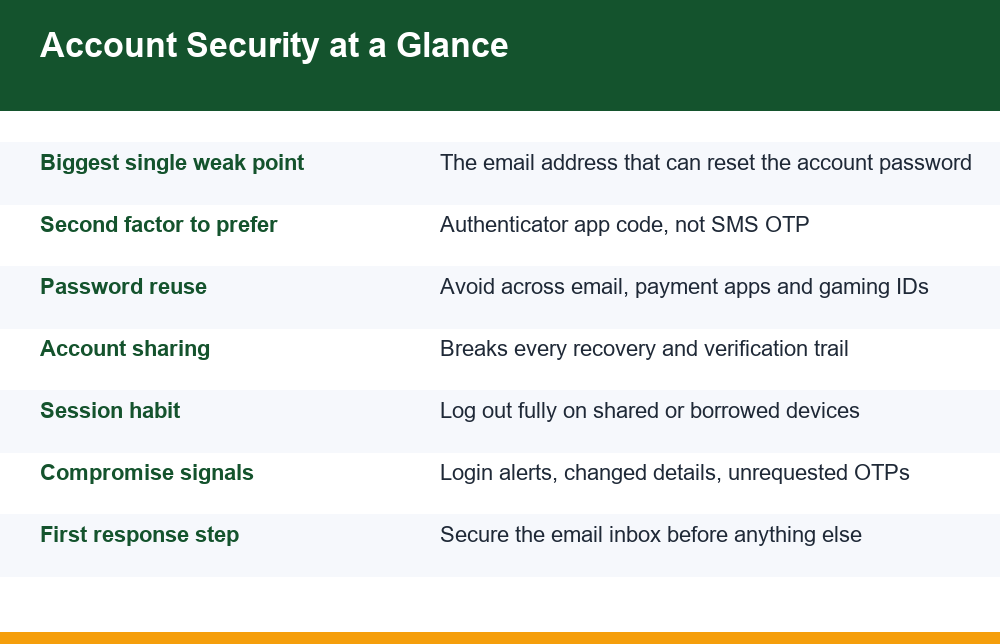
If you fix things in the order the typical article lists them, you spend your effort in the wrong place. The honest priority order is: secure the recovery email first, move off SMS codes second, stop reusing credentials third, stop sharing the account fourth, and only then worry about the casino password itself and network hygiene. Everything in this breakdown follows that order rather than alphabetical convenience.
That ordering matters because effort is finite. Most people will act on two or three lines of a page like this one, not nineteen. If the two or three they pick are the ones that actually carry the risk, the account is in a genuinely different position. If they pick the ones that feel productive — a longer password, a different browser — while the recovery email still shares a password with a decade-old forum account, nothing has changed where it counts.
Why Your Email Account Is the Real Key
Think about what a password reset does. You click “forgot password”, a link arrives in your inbox, and whoever opens that link sets the new password. The casino password is therefore not the lock — it is a convenience. Anyone with persistent access to your email can take ownership of the account at a time of their choosing, and they can do it without ever guessing a single character of your existing password.
This has a second and nastier consequence. An attacker inside your email can also read the verification correspondence, the payment confirmations and the support tickets. That tells them your registered name, which documents you submitted, which payment method is attached and how the support team talks to you. From there they can impersonate you convincingly in a support chat. That is why the email account is not merely one factor among several — it is the master record.
There is an asymmetry worth noticing. Hardening the account itself is bounded work: one password, one two-factor setting, one device list. Hardening the inbox is where the leverage is, because the inbox sits upstream of every account registered to it. Fixing it once improves the position of the real-money account, the payment app and everything else that sends a reset link to the same place. Putting the inbox first in online casino account security is not a stylistic preference — it is simply where one action buys the most.
There is a related trap with phone numbers. Many people register with a number they later stop using, or a number tied to a prepaid connection they let lapse. When that number is recycled and reissued to someone else, every code sent to it goes to that person. A dormant registered number is a slow-motion account handover, and nothing on the account side will warn you about it.
Practical steps for the inbox
- Use a dedicated email address for real-money accounts, separate from your everyday personal and work mail. If that inbox receives nothing else, anything unexpected in it is immediately suspicious.
- Give that email address a password you use nowhere else, and protect it with an authenticator app rather than a text message.
- Review the recovery options on the email account itself. A forgotten secondary address or an old phone number listed as a backup is a side door that bypasses everything else.
- Check the email provider’s active-sessions or device list periodically and sign out anything you do not recognise.
- If the registered phone number changes, update it on the account the same week — do not leave the old one in place “just in case”.
- Never forward verification mail to a second address for convenience. It doubles the number of inboxes an attacker can target.
- Look at the forwarding and filter rules on the inbox as well as the password. A rule that quietly copies or files away mail from the operator is the single most effective thing an intruder can leave behind.
One more point that is specific to real-money accounts rather than game libraries: your email is also where the identity paperwork lands. If you want to understand why that paperwork exists and what a legitimate request for it looks like, read the walkthrough on how casino identity verification actually works — knowing the normal process is what lets you recognise the fake version of it.
Online Casino Account Security: The 9 Habits, Step by Step
Here is the full stack, in priority order. Treating online casino account security as nine habits rather than one setting is the point: no single toggle protects an account, and the habits reinforce each other. Each item below is a thing you do, not a thing you buy.
- Isolate the email. One address, used only for real-money accounts, with a unique password and app-based two-factor. This is the highest-value single action available to you.
- Move off SMS codes where you can. If the account offers an authenticator app option, use it. If it only offers text messages, treat the registered number as a critical asset and keep it active and in your own name.
- Make every password unique. Not “varied” — unique. A password manager makes this trivial; a short list kept somewhere private is better than reuse.
- Never share the login. Not with a friend, not with a relative, not with anyone offering to manage, boost or recover the account. Sharing is covered in detail further down because it is the failure point people underestimate most.
- Never read a code aloud or forward it. A one-time code is a signature. Anyone asking for it is asking you to sign something you cannot see.
- Log out deliberately. Closing a tab is not logging out. On any device that is not exclusively yours, log out and clear the session before you walk away.
- Review the device and session list. If the account exposes a list of logged-in devices, check it monthly and remove anything stale.
- Keep notifications on. Login alerts, withdrawal alerts and detail-change alerts are the only early warning you get. Muting them to reduce noise removes the smoke detector.
- Keep the attached payment method narrow. One method, one account, no stored card details where storage is optional, and no shared wallet. A narrow payment surface limits what a compromise can reach.
Habits one, three and four carry most of the weight. If you only ever act on three lines from this page, make them those three. The remaining six reduce how much damage a mistake does, which matters, but they do not prevent the handover of an account in the way the first three do.
It is worth being precise about why these are framed as habits. A setting is a state: it is either on or off, and once it is on you stop thinking about it. A habit is a decision you make repeatedly under slightly different conditions — when a caller sounds plausible, when a friend asks for the login “just this once”, when you are in a hurry on someone else’s laptop. Every real failure described on this page happens at one of those decision points, not at a settings screen. That is why the list is nine behaviours and not nine checkboxes.
The three mistakes to avoid above all
- Using the same password on your inbox that you have used anywhere else, ever.
- Passing a one-time code to a human being for any reason, however the request is framed.
- Letting a second person hold the login — including anyone who offers to manage or recover the account for you.
Is an Authenticator App Safer Than SMS OTP?
Yes, meaningfully so, and the reason is worth understanding rather than memorising. An authenticator app generates a code on your device from a secret stored on that device. Nothing travels across a network and nothing passes through a third party. An SMS code, by contrast, is a message that leaves the operator’s system, crosses a carrier network, and lands on whatever device currently answers to that number. Every one of those hops is a place where the code can be diverted, delayed or read.
Mechanically, most authenticator apps work from a shared secret established once when you set the account up, combined with the current time, to produce a code that changes every thirty seconds or so. Because both your device and the account’s own system can compute the same value independently, nothing needs to be transmitted at the moment you log in. That is the whole of the advantage: there is no message in flight to intercept, and no phone number in the chain to lose.
The practical weaknesses of SMS are mundane rather than exotic. A number can be ported away or reissued after a connection lapses. A notification preview can be read off a locked screen. A message-mirroring permission granted to a careless app can forward it. And most commonly of all, a convincing caller can simply ask you for it. That last route is not a flaw in SMS technology at all — it is the reason code-phishing works so reliably, and it is why the single most useful rule here is that a code is never shared with a human being.
The anatomy of that specific attack is set out in the breakdown of how one-time code requests are used to take over accounts, including the scripts that callers use.
| Factor | SMS one-time code | Authenticator app code |
|---|---|---|
| Where the code is generated | Operator’s system, then sent over the carrier network | On your own device, offline |
| Exposed to number porting or reissue | Yes | No |
| Readable from a lock screen preview | Often | Only if the app itself is opened |
| Works without mobile signal | No | Yes |
| Vulnerable to a caller asking for the code | Yes | Yes — this risk is identical |
| What happens if you lose the device | Usually recoverable by replacing the SIM | Needs backup codes saved in advance |
| Overall position | Acceptable fallback, weakest common option | Preferred where offered |
Note the row where both columns say yes. Switching to an authenticator app removes the network and carrier risks entirely, but it does nothing about persuasion. Someone who can talk you into reading out an SMS code can talk you into reading out an app code just as easily. The technology upgrade and the behavioural rule are two separate defences, and online casino account security depends on both independently.
If you do move to an authenticator app, save the backup or recovery codes somewhere offline the same day. The most common regret with app-based two-factor is a lost or wiped phone and no way back in. Write them down and store them where you store documents, not in the same inbox the app is protecting. If the app you choose offers an encrypted cloud backup of its secrets, understand what protects that backup before relying on it — a backup secured by a password you have used elsewhere puts the second factor back on the same footing as the first.
Should You Use the Same Password for Different Gaming Accounts?
No, and the risk here is not that someone sits and guesses your password. The real mechanism is credential stuffing. When any unrelated website suffers a breach, the leaked email-and-password pairs get collected and replayed automatically against hundreds of other services. If the pair that leaked from a forum you joined years ago still works on your email provider or a real-money account today, the account is taken over by a script, not a person. No one had to target you.
This is why reuse is one of the two largest failure points in online casino account security, alongside account sharing. It converts someone else’s security failure into your loss, and it does so silently — you have no way of knowing which of the services you signed up to over the past decade has been breached, or when.
Variations do not help as much as people think. Adding a digit, a year, or the site’s name to the end of a base password produces exactly the pattern that automated tools try next. If one of your passwords is the base phrase plus a suffix, assume all of them are compromised together.
The tiers that actually matter
- Tier one — never reused, never shared, never written in a chat: your primary email, your payment or banking apps, and any real-money account.
- Tier two — unique but lower stakes: shopping accounts, streaming, forums. Unique passwords here still matter, because they are the breaches that feed the stuffing lists.
- Tier three — throwaway: one-off signups you will never return to. Use a disposable approach and do not let these touch your tier-one email address.
A password manager removes the memory problem entirely and is the single most practical answer. If you will not use one, the fallback is a short private written list kept physically — which is far from ideal, but still vastly better than one password spread across your inbox, your payment app and your gaming IDs.
Two related habits are worth separating out. The first is the browser’s own saved-password store: convenient, and reasonable on a device only you use, but it becomes a full credential dump the moment the browser profile is synced to a shared machine or the device changes hands. The second is “sign in with” buttons that attach a real-money account to a social or email identity. They remove a password, which is genuinely useful, but they also mean the security of that one identity provider is now the security of everything behind it — which brings you straight back to hardening the inbox first.
What Happens If Someone Else Logs Into Your Account
Account sharing is where the real-money context diverges hardest from console gaming, and it is the omission that makes most published advice on this topic useless. Sharing a game library with a sibling is a minor matter. Sharing a verified real-money account is a structural problem, and it produces consequences in four directions at once. It is one of the two points where online casino account security fails most often, and it is almost never mentioned.
First, the identity trail breaks. The account is registered to one named person, and every record — verification, payment, support history — points at that person. Activity by anyone else makes that record inconsistent, and inconsistency is what triggers holds, freezes and additional document requests.
Second, you lose the ability to tell authorised access from unauthorised access. Once two or more people have logged in, a login alert means nothing. You cannot say whether an unfamiliar session is a relative on his phone or a stranger working from a leaked password. The entire early-warning system you built in habits seven and eight goes dark.
Third, the credential spreads beyond your control. The person you shared with may reuse it, save it in a browser on a shared computer, send it over a messaging app, or pass it to a third person who asked nicely. You have no visibility into any of that and no way to undo it except a full password reset — which only works if you still control the email.
Fourth, and most practically: a genuine dispute becomes unresolvable. If you ever need to raise a problem about activity on the account, the first question is who was logged in. “Several of us use it” closes the conversation. Shared accounts have no clean story to tell.
Where online casino account security breaks under pressure
The variant worth naming explicitly is the managed-account offer: someone in a group chat or a messaging channel proposing to run, recover, boost or verify your account for you. That is account sharing with an extra step, and the person asking has none of your interests. There is no circumstance in which handing a login to a stranger improves your position — if they can do something with your credentials that you cannot do yourself, that is a reason for suspicion, not reassurance.
The softer version is harder to refuse: a family member or close friend who wants to use the account briefly, with no bad intent at all. The problem is that intent is not what causes the damage. A well-meaning person logging in from an unfamiliar device, saving the password on a shared laptop, or asking you to forward a code produces exactly the same broken records and the same dead early-warning system as a hostile one. The honest answer to a sharing request is that the account cannot be lent without permanently degrading it.
Session and Device Discipline
Sessions are the quietest gap in online casino account security because nothing ever appears to go wrong. A session is the token that keeps you logged in after you have authenticated. It persists after you close the tab, after you close the browser, and often for days or weeks afterwards. Password strength and two-factor settings are both irrelevant to an attacker who inherits a live session — they are already past the gate.
The practical risk is ordinary: a borrowed laptop, a family computer, an office machine, a browser profile synced across devices, or a phone that someone else picks up. In each case the next person to open the browser is logged in as you, with no challenge of any kind. This is also why changing a password is not by itself a complete response to a suspected compromise — unless the account also revokes other sessions, an intruder’s existing session may simply continue.
What deliberate logout looks like
- Use the account’s own log-out control rather than closing the window. Closing a window ends your view of the session, not the session.
- Decline “remember me” and “keep me signed in” on any device that is not exclusively yours.
- Decline browser offers to save the password on shared machines, and clear saved credentials if you have accepted in the past.
- Check the account’s device or session list where one exists, and revoke everything you do not currently use.
- Treat a lost or sold phone as a live session that needs revoking, not just a lost device — and wipe it remotely if the option exists.
- Avoid logging in at all on machines you do not control — a public terminal or a shared cafe system can log keystrokes, and no amount of careful logging out undoes that.
- Keep the device itself locked with a PIN, pattern or biometric. An unlocked phone is an unlocked session for every app on it.
Session length is also where security and self-management overlap. A session that never expires removes the natural stopping point from the activity itself, which is a separate issue from account takeover but worth understanding in the same sitting. The discussion of why long open sessions cause problems beyond security covers that overlap in more detail.
How to Know If Your Account Has Been Compromised
Compromise rarely announces itself. The useful signals are small administrative changes rather than dramatic events, because an attacker’s first move is almost always to secure their own access — change the recovery details, suppress the alerts, then act. Noticing the first step is what gives you time.
Watch for these, and treat any of them as a reason to act immediately rather than to wait and see.
- A password-reset or email-change notification you did not request, on either the account or the email behind it.
- A one-time code arriving when you were not logging in. This means someone has your password and is at the second step.
- A login alert from a device, browser or location you do not recognise.
- The registered email address, phone number or payment details showing values you did not set.
- Verification or document requests arriving out of nowhere, which can indicate someone else is driving a process on the account.
- Account notifications suddenly stopping, or mail from the operator appearing already-read or in a filter you did not create.
- Being signed out unexpectedly, or finding your password no longer works.
- A second factor you did not add, or a backup email or phone number appearing in the recovery settings.
Two of these deserve a special note. An unrequested one-time code is the clearest single signal available — it tells you the password is already known. And an email filter you did not create is the classic suppression move: mail from the operator is routed away from your view so that the real alerts never reach you. If you see either, assume compromise rather than coincidence.
Be careful with the opposite error as well. Not every odd notification is an intrusion: alerts fire when a phone updates its operating system, when a network assigns a different address, or when an app reinstalls and starts a fresh session. The distinguishing question is whether you can account for the event yourself. An unfamiliar login you can explain is noise; an unfamiliar login you cannot explain, or any change to the recovery details, is the signal.
Check periodically rather than reactively. A five-minute review each month of the device list, the registered contact details and the notification settings on both the account and its email will surface a change long before it becomes expensive. Keeping that review on a schedule is the part of online casino account security that costs almost nothing and is skipped almost universally.
If It Goes Wrong: A Calm Response Checklist
The instinct when you suspect a problem is to change the account password first. That is the wrong order. If the attacker is sitting in your email, your new password is one reset link away from being theirs again. Secure the inbox, then the account, then the payment side. Work down the list and do not skip ahead.
- Secure the email first. New unique password, app-based two-factor enabled, all other sessions signed out, and recovery options, forwarding rules and filters reviewed for anything added.
- Then the account itself. New unique password, revoke every other session or device, re-check the registered email, phone and payment details against what they should be.
- Then the payment side. Review recent movement on the attached method and raise anything unrecognised through that provider’s own official channel — reached from your own records, never from a link or number supplied by whoever contacted you.
- Document everything. Dates, times, the exact notifications you received and screenshots of changed details. Reconstructing this later from memory is close to impossible.
- Check your other accounts. If a reused password was involved anywhere, every account sharing it is now exposed and needs the same treatment.
- Use the official help channel. In India, the government’s National Cyber Crime Reporting Portal is the official place to report online fraud and account-takeover incidents, and it publishes the official helpline number as well. Go to the official portal directly rather than through any intermediary who offers to file on your behalf.
Be alert to a specific follow-on pattern: after a compromise, people are frequently approached by someone claiming to be able to recover the account or the money, usually for a fee or for the login details. Treat every unsolicited recovery offer as a second attempt on the same target. Official processes do not come to you through a stranger’s direct message.
Timing matters more than completeness. A partial response made within the hour — inbox secured, sessions revoked — is worth more than a thorough one made the next day, because most of the damage in an account takeover happens early, while the intruder still has quiet access. Do the first two steps immediately, then work through the rest carefully.
Finally, step back from the checklist for a moment. Strong online casino account security protects access and records; it does not change the economics of real-money play, where losses remain the expected outcome. If the activity itself has become a source of stress rather than something you are choosing freely, that is worth addressing on its own terms and independently of anything on this page.
Frequently Asked Questions
How do I secure my online casino account?
Work in priority order rather than down a generic checklist. First, isolate and harden the email address that controls password resets — unique password, authenticator-app two-factor, no stray recovery addresses, and no filters or forwarding rules you did not create. Second, enable app-based two-factor on the account itself where offered. Third, make every password unique so that someone else’s data breach cannot be replayed against you. Fourth, never share the login and never read a one-time code to anyone. After those four, log out deliberately on any device that is not exclusively yours, review the device and session list monthly, keep all notifications switched on, and keep the attached payment method narrow.
Is an authenticator app safer than SMS OTP?
Yes. An authenticator app generates the code on your own device, offline, from a secret established once at setup, so there is no carrier network, no message in transit and no number that can be ported away or reissued. SMS codes travel through several systems and land on whichever device currently answers that number, and they can be read from a lock-screen preview. The one risk both share identically is persuasion: if someone talks you into reading out a code, it makes no difference where the code came from. Switch to an app where it is offered, save the backup codes offline the same day, and keep the rule that codes are never shared with a person.
Why is my email account the real key to my casino ID?
Because a password reset is sent there. Whoever controls the inbox can request a reset link and set a new password without ever knowing the old one, which makes the email the actual lock and the account password merely a convenience. Worse, the inbox also holds the verification correspondence, payment confirmations and support history, so an intruder reading it learns enough to impersonate you convincingly in a support conversation. A related trap is a dormant registered phone number: once a lapsed connection is recycled to someone else, every code sent to it goes to a stranger.
What happens if someone else logs into my account?
Four things, all bad. The identity trail becomes inconsistent, because the records point at one named person while the activity does not, and inconsistency is what triggers holds and extra document requests. You lose your early-warning system, because a login alert no longer distinguishes an authorised user from an intruder. The credential spreads beyond your control, since the person you shared with may reuse it, save it on a shared computer or pass it on. And any genuine dispute becomes unresolvable, because the first question is who was logged in. The managed-account offer — a stranger proposing to run or recover your account — is the same problem with an extra step.
Should I use the same password for different gaming accounts?
No. The danger is not someone guessing it but credential stuffing: when any unrelated site is breached, the leaked email-and-password pairs are replayed automatically against hundreds of other services. Reuse turns someone else’s security failure into your loss, silently, because you cannot know which of your old signups has been breached. Small variations do not help either — a base phrase plus a year or the site’s name is exactly the pattern automated tools try next, so if one such password is exposed, treat them all as exposed. Keep your email, payment apps and any real-money account on unique passwords that exist nowhere else.
How do I know if my account has been compromised?
Look for small administrative changes rather than dramatic events. The strongest single signal is a one-time code arriving when you were not logging in, which means the password is already known and someone is at the second step. Others include password-reset or email-change notices you did not request, login alerts from unfamiliar devices, registered contact or payment details you did not set, a second factor or backup number you did not add, unexpected verification requests, and sudden silence from the operator or mail appearing pre-read — a filter you did not create is the classic way an intruder suppresses alerts. A five-minute monthly review of the device list, contact details and notification settings catches most of this early.