Almost all of the UPI payment scams that reach gaming and prediction app users land in the same ninety seconds: the moment you tap deposit and the screen hands you a handle to pay, a QR code to scan, or a countdown timer. Bank awareness pages treat UPI fraud as a general topic – stranger calls, fake customer care, lottery messages. They rarely describe the specific flow where a cricket-ID panel or a colour-prediction app routes you to a personal UPI address, asks you to paste a reference number into a chat window, and then goes quiet.
That flow has its own tells, and three of them are absolute rules of how the payment system works rather than matters of judgement. This breakdown stays on that narrow ground: what the payment rails can and cannot do, what a deposit screen should never ask, and what to do in the hours after money has already left. One honesty line before anything else – real-money play is 18+, carries real risk, and losses are the expected outcome; nothing here changes that, it only keeps the payment side from making a bad day worse.
Where UPI Payment Scams Actually Begin
A properly built checkout looks boring. You get a hosted payment page, a merchant name that matches the brand, an order reference generated before you pay, and a success or failure state that the platform itself can see. The deposit flows where UPI payment scams take root look different in a way that is easy to miss when you are in a hurry: the payment instruction arrives as content rather than as a system. A handle typed into a chat bubble. A QR image forwarded on a messaging app. A line of text saying pay to this ID and send screenshot.
The shift matters because it moves the proof of payment from the rails to you. When a hosted gateway processes a deposit, the credit is automatic – the platform’s own systems know the money arrived. When you pay a bare handle and then paste a UTR number into a support chat, a human on the other side decides whether to believe you. That decision can be slow, selective, or simply never made, and you have no counter-party to escalate to because no merchant relationship exists.
The second thing that changes is reversibility. A card payment or a gateway transaction sits inside a dispute process run by the parties that handled it. A UPI transfer to a person is designed to be final and instant; that is the whole point of the product. So the window where you have any control at all is before you authorise, not after. Every check in this piece is front-loaded for that reason, and it is also why the same habits that protect the login and recovery side of your gaming account need a payment equivalent.
Finally, understand that urgency is engineered. Timers, “bonus expires in 4:59”, a support agent typing that the rate changes at midnight – these exist to compress the moment of inspection. A genuine payment flow does not get worse if you look at it for thirty seconds, and nothing about a real deposit becomes impossible because you paused to read the payee name.
Receiving Money Never Needs Your UPI PIN
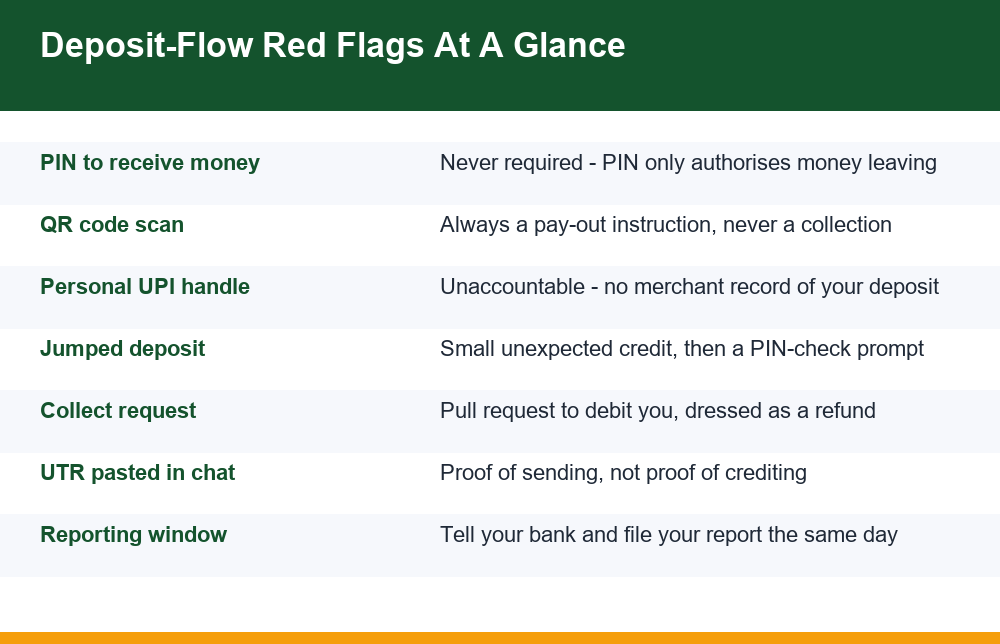
This is the single most useful fact about UPI, and the one most consistently exploited. Your UPI PIN authorises money leaving your account. It does nothing else. There is no situation – none – in which entering the PIN causes money to arrive. Not for a withdrawal. Not for a bonus credit. Not for a refund. Not to “verify” or “activate” a receiving account.
So when a deposit or payout conversation produces a prompt to enter your PIN in order to receive something, the transaction in front of you is a debit wearing a disguise. The usual mechanism behind these UPI payment scams is a collect request: UPI allows a party to send you a request to pay, which appears in your app as a pending item needing approval. Approve it and you have paid them. The screen often carries their own chosen description text, so it can literally read “Withdrawal Credit” or “Refund Processing” while debiting you.
Two habits follow. First, read the direction of travel on the authorisation screen itself, not the message that led you there – your app will say whether you are paying or being paid, and that line is generated by the payment system, not by the person asking. Second, treat any PIN prompt you did not initiate as a stop signal. If you did not open your UPI app and choose to send money, you should not be typing a PIN.
- PIN prompt to receive a payout, bonus or refund – always a debit
- A pending “collect” or “request” item you did not expect – decline, do not approve
- An agent reading a PIN out to you or asking you to confirm digits – no payment operator does this
- A screen-sharing or remote-help app installed “to fix the deposit” – ends the conversation
- A PIN reset link sent by someone else – resets are started by you, inside your own app
It is worth knowing why the rule is so absolute, because understanding it makes it very hard to talk you out of. Your PIN exists to prove, to your own bank, that you consent to a debit from your account. Money arriving needs no consent from you at all; it is the sender’s bank that needs the sender’s authorisation. That is why there is no screen anywhere in the system that takes a PIN in exchange for an incoming credit – such a screen would have nothing to authorise. Anyone who tells you otherwise is describing a product that does not exist.
Why A Gaming App Asks You To Pay A Personal UPI ID
A personal handle – somebody’s name attached to a bank or wallet suffix – is not automatically a scam. Plenty of small operations run that way out of convenience or because they cannot obtain payment processing. But it removes every structural protection you had, and that is why the pattern recurs across UPI payment scams aimed at gaming deposits.
When you pay a person, there is no merchant category, no settlement report, no reconciliation file. Nothing on the rails connects your transfer to your account on their platform. The link is made manually, by whoever reads your message. If they choose not to, or if the handle belonged to someone unconnected to the platform in the first place, your money went to an individual who owes you nothing traceable.
There is also a rotation tell worth watching. Deposit handles that change every few days, or differ depending on which agent you speak to, usually indicate accounts being cycled because they keep getting frozen or flagged. If the same “official” platform gives you three different payees in a month, the payees are not the platform.
| Payment destination | What it proves | Your position afterwards |
|---|---|---|
| Hosted gateway checkout, merchant name matches brand | A merchant relationship exists and the credit is automatic | Strongest – the platform’s own system saw the payment |
| Verified merchant UPI handle shown inside the app | Payment is tied to an identifiable business account | Reasonable – traceable payee, in-app record |
| Personal handle typed into a chat window | Only that money left your account | Weak – crediting depends on a person believing you |
| QR code forwarded over a messaging app | Nothing about who the payee is | Very weak – image may not match the stated brand at all |
| Handle that changes between deposits or agents | Accounts are being cycled | Avoid – no continuity to escalate against |
One more consequence people underestimate: if deposits arrive through anonymous channels, payouts tend to behave the same way. The same operations that take money from a personal handle are the ones that invent documentation delays later, which is why understanding how a withdrawal request is supposed to move from request to bank credit tells you more about a platform than its deposit page does.
Can Scanning A QR Code Take Money From Your Account?
Scanning alone cannot move money. A UPI QR code is a container for payee details and sometimes an amount; your app reads it, fills the form, and waits for you to authorise. Nothing leaves until you enter your PIN. So the honest answer is that the scan is safe and the authorisation is where the risk lives – and that is where the QR variants of UPI payment scams do their work.
The important structural point is the direction. A UPI QR code is always a pay-out instruction. It cannot pull money toward you. There is no such thing as a “scan to receive your winnings” code, a “scan to claim your refund” code, or a “scan to verify your account” code. Any of those phrases attached to a QR image describes a payment you are about to make, framed as one you are about to receive.
- “Scan to receive your winnings” – you would be paying, not collecting
- “Scan this to claim your refund” – a refund needs nothing from you but your handle
- “Scan to verify your deposit account” – verification is not a transaction
- “Scan and send 1 rupee to activate payouts” – a real payout needs no payment from you
- A QR sent as a photo with a brand name typed underneath – the caption is not data
Where QR codes do deceive is in display. A forwarded image can carry any payee name as a caption while encoding a different handle entirely, and the caption is just pixels. Before authorising, read the payee name your own app resolves from the code, not the text around the image. If your app shows an individual’s name where you expected a business, stop. Also check whether the amount was pre-filled and locked – a pre-filled figure that does not match your intended deposit is a reason to abandon the screen, not to adjust it.
The same logic applies to short links and in-app browser windows that open a payment sheet automatically. The sheet itself is trustworthy; what it says the money is for may not be. Treat the sheet as a question – who is being paid, how much, and did I start this? – rather than as a step to complete.
The Jumped Deposit Scam, Broken Down
The jumped deposit scam is one of the more inventive UPI payment scams because it uses your own reflexes rather than a lie. The sequence is short. A small amount you were not expecting lands in your account – often a few rupees or a few hundred. Your phone shows the credit. Moments later a request appears, or a prompt asks you to check your balance, and the natural response is to open your UPI app and tap something.
That tap is the whole trick. Sitting in the queue is a collect request for a much larger sum, placed there before the small credit arrived. If you enter your PIN at the first prompt you see – to check a balance, to confirm the credit, to “verify” the deposit – you may be approving that pending debit instead. The small incoming amount exists only to make you open the app in a hurry and trust whatever appears first.
In a gaming context it arrives with a cover story: a tiny “test credit” before a payout, a “bonus unlock” amount, an apology refund for a failed deposit. The defence is narrow and reliable. When an unexpected credit appears, do not open your payment app immediately. Wait, then open it yourself from the home screen rather than from a notification, and read any pending request fully before touching it. Checking a balance does not require approving anything, and a real credit does not need confirming by you.
If a pending request is waiting, decline it rather than letting it expire quietly, and if the unexpected money genuinely was not yours, leave it alone and tell your bank rather than forwarding it onward to whoever claims it. Forwarding it manually is exactly what the next message will ask for, and a transfer you authorised yourself is far harder to unwind than a credit you simply left untouched.
7 Checks Before Any Gaming Deposit
None of these take longer than the countdown timer you are being shown. Run them in order; the first failure is enough to stop. Used consistently, they close off the great majority of UPI payment scams built around deposit screens.
- Direction. Does my own app say I am paying, or receiving? If a PIN is being requested, money is leaving. No exceptions.
- Payee identity. Who does my app resolve the handle or QR to? An individual’s name where a business should be is a stop, not a shrug.
- Origin of the request. Did I start this from inside the app’s own deposit flow, or did a link, chat message or forwarded image start it for me?
- Amount. Does the figure on the authorisation screen match the number I typed, to the rupee? Pre-filled and locked amounts get abandoned.
- Continuity. Is this the same payee as my last deposit? Rotating handles mean rotating accounts.
- Record. Will anything other than my own screenshot connect this payment to my account? If crediting depends on a person reading a chat, treat the money as at risk.
- Pressure. Is a timer, bonus expiry or agent urgency pushing me to skip checks one to six? That pressure is the tell.
Add two standing habits around the checks. Keep a single low-balance account or a small payment-app limit for anything recreational, so the worst case is bounded rather than open-ended. And keep your own record of every deposit – date, amount, exact payee handle, reference number – in one place. If a dispute ever happens, the person with dates and handles written down is in a far better position than the person scrolling a chat history.
One caution on evidence. A transaction screenshot proves only that you sent money; it does not prove the other side credited it, and images are trivially altered. The reverse case, where an altered payment screenshot is used as proof that money was already sent to you, runs on the same weakness and is worth recognising from both directions.
What To Do If You Sent Money To The Wrong UPI Handle
Speed matters more than anything else here, and the first hour is worth more than the next week. Act in this order.
- Open the transaction in your UPI app and raise a complaint or dispute from inside that transaction. This creates a reference number tied to the payment rather than a loose message.
- Contact your bank’s official helpline using the number printed on your card, your passbook or the bank’s own app – never a number sent to you in a message or found in a search ad.
- Note the exact details: amount, date and time, your reference or UTR number, and the payee handle as it appeared on your authorisation screen.
- File a report through the official cybercrime reporting channel if deception was involved rather than a simple typing error.
- Keep every acknowledgement and reference number in one file, and follow up in writing rather than only by phone.
Be realistic about outcomes. A genuine mistyped-handle transfer to an unrelated person can sometimes be resolved when that person cooperates, because the money sits in an identifiable account. Money sent into a fraud chain usually moves within minutes and is far harder to recover; speed is what gives a freeze request any chance at all. Nobody who contacts you afterwards offering recovery for a fee is helping – a second payment to get the first one back is a common follow-up pattern targeting people who have already lost money to UPI payment scams.
Two details make the difference between a report that can be acted on and one that cannot. The first is the transaction reference, usually shown as a UTR in your app’s transaction detail view; it is the identifier that points at the exact payment across both banks. The second is the payee handle as your own app displayed it at the moment of authorisation, not as it appeared in the chat message, because those can differ and only the first describes where the money actually went. Capture both before you start making calls, so you are not hunting for them on a screen while someone waits on the line.
Also refuse the “small verification payment” variant. If recovering ten thousand rupees supposedly requires sending five hundred first, the five hundred is the actual transaction being sold to you. The same applies to anyone who asks for remote access to your phone in order to “process the reversal”. A reversal, where one is possible at all, happens between banks and needs nothing installed on your device.
How To Report A UPI Fraud In India
Reporting runs on two tracks that you should start in parallel rather than one after the other. The payment track is your bank and your payment app: a dispute raised inside the transaction, plus a call to the bank’s own published helpline, is what can trigger a hold on a receiving account while it still holds funds. The complaint track is the national cybercrime reporting channel, which exists for financial fraud reports and is where a formal record of the deception is created.
Have your details ready before you start either: amount, timestamp, UTR or transaction reference, payee handle, the name your app resolved, and screenshots of the messages that led you to pay. Reports with exact references move; reports with approximations stall.
For the complaint track, go directly to the government’s own address rather than through a link somebody sends you – the national cybercrime reporting portal is the official, non-commercial destination, and it carries a financial fraud category along with a helpline number for urgent cases. Typing that address yourself is part of the protection, because lookalike pages that collect your details instead of your complaint are a predictable second layer on top of the first loss.
Two practical cautions specific to this situation. First, find helpline numbers and reporting portals yourself, through the bank’s app or the official domain, because search results and social posts for “UPI complaint number” are a known hunting ground for the next round of UPI payment scams. Second, never grant remote access or install a screen-sharing tool for anyone claiming to process your complaint. No genuine process requires watching your screen or holding your PIN.
Finally, report even when the amount feels too small to bother with and even when you feel foolish. Small reports are what establish patterns around a receiving account, and embarrassment is the main reason these operations keep running the same scripts unchanged for years.
Mistakes That Keep Costing People Money
The errors below are not failures of intelligence. They are what a well-built urgency screen is designed to produce, and naming them in advance is most of the defence against UPI payment scams at the deposit stage.
- Treating a PIN prompt as a formality because the surrounding message promised a credit
- Reading the caption on a forwarded QR image instead of the payee name the app resolves
- Paying a different handle each time because an agent said the old one was “under maintenance”
- Believing a screenshot settles a dispute, in either direction
- Opening a payment app straight from a notification after an unexpected credit
- Searching for a complaint helpline instead of using the number inside the bank’s own app
- Sending a second payment to recover a first one
- Using a primary salary account, with its full balance exposed, for recreational deposits
Strip everything else away and three facts do the heavy lifting. A PIN only ever sends money. A QR code only ever pays out. A personal handle leaves you with no record anyone else is obliged to honour. Hold those three and the elaborate stories built around them stop working, because every one of them needs you to believe that money can arrive through an action that, by design, can only make money leave.
Frequently Asked Questions
Do I need to enter my UPI PIN to receive money?
No. The UPI PIN authorises money leaving your account and nothing else. There is no transaction type in which entering it causes money to arrive. If a payout, bonus, refund or “account verification” step asks for your PIN, you are being shown a debit with a misleading description – usually a collect request that charges you once approved. Read the direction of travel on the authorisation screen your own app generates, not the message that sent you there, and treat any PIN prompt you did not personally initiate as a stop signal.
Why does a gaming app ask me to pay a personal UPI ID?
Usually because it has no merchant payment processing, and sometimes because the handle has nothing to do with the platform at all. Either way you lose every structural protection: no merchant record, no settlement report, and nothing on the payment rails linking your transfer to your account on their system. The credit then depends on a person reading your message and choosing to act. Handles that change between deposits or differ by agent are a strong signal that receiving accounts are being cycled because they keep getting flagged.
What is the jumped deposit scam?
A small, unexpected credit lands in your account, and a prompt immediately encourages you to open your payment app – to confirm the credit, check your balance or claim something. Waiting in the queue is a collect request for a much larger amount, placed there beforehand. If you enter your PIN at the first prompt you see, you may approve that debit. The small credit exists only to make you open the app in a hurry and trust whatever appears first. The defence: do not open the app from the notification, open it yourself and read any pending request fully before touching it.
Can scanning a QR code take money from my account?
Scanning alone cannot. A UPI QR code carries payee details and sometimes an amount; your app fills the form and nothing moves until you authorise with your PIN. The risk is in the authorisation, not the scan. The key structural fact is that a UPI QR code is always a pay-out instruction and can never pull money toward you, so any “scan to receive your winnings or refund” framing describes a payment you are about to make. Read the payee name your app resolves from the code rather than the caption on a forwarded image, and abandon any screen with a pre-filled amount that does not match your own figure.
How do I report a UPI fraud in India?
Run two tracks at once. First the payment track: raise a dispute from inside the transaction in your UPI app and call your bank on the number printed on your card, passbook or in the bank’s own app – never a number from a message or a search ad. Second, file a report on the national cybercrime reporting portal, typing the official address yourself rather than following a link somebody sent you. Have the amount, timestamp, UTR or transaction reference, the payee handle and supporting screenshots ready, because exact references move and approximations stall. Never grant remote access or install screen-sharing software for anyone claiming to process your complaint.
What should I do if I sent money to the wrong UPI handle?
Act within the first hour. Raise a complaint from inside that specific transaction in your app, call your bank’s official helpline, and record the amount, time, reference number and the payee handle exactly as it appeared on your authorisation screen. A genuine typing error that reached an identifiable account can sometimes be resolved with that person’s cooperation. Money sent into a fraud chain moves within minutes, so speed is what gives a freeze request any chance. Ignore anyone who offers recovery for an upfront fee – that second payment is the real transaction being sold to you.